In this post We are going to see How Knockout, ASP.Net Web API and ASP.Net works together smoothly. There are lots many examples of ASP.Net MVC,Web API and Knockout.js available on web working together nicely. So I thought it will be a good idea to write a blog post about how ASP.Net Web API, ASP.Net Web Forms,Knockout.js works together and how we can create simple data binding with Knockout.js.
As we all know ASP.Net Web Forms is one of premier development technology widely use in creating web sites and web applications. ASP.Net Web Forms allow to create dynamic websites using event driven model. It is one of the easiest way to create web applications and web sites.
ASP.Net Web API is a framework that allows to build HTTP Service that reach a broad range of clients including browsers and mobile devices.It provides very easy way to write restful http services. Its can be access by any type of client over HTTP protocol. Client can make a GET, PUT,POST and DELETE request based on its requirement and get the response appropriately.
As per knockoutjs.com, Knockout is a JavaScript library that helps you to create rich, responsive display and editor user interfaces with a clean underlying data model. It provides a way to declarative bindings using an ‘Observable’ view model on browser. It supports two way bindings.
Saturday, May 4, 2013
Friday, May 3, 2013
Server.Map alternative in WCF - HostingEnvironment.MapPath
If you are ASP.NET programmer then you already know about Server.MapPath. It is used to map a physical location on webserver for asp.net. You can find more information about Server.MapPath from the following location.
http://msdn.microsoft.com/en-us/library/ms524632(v=vs.90).aspx
You can still use that in WCF(Windows Communication Foundation) service http bindings. As we know WCF Service can use other non http bindings like TCP/IP,MSMQ and Named Pipe. At that time HttpContext of WCF will be none so server.mappath will not be available as current context is not available. Because its a child class of HttpContext.Current.
HostingEnvironment.MapPath works on all kind of bindings. So when you have other bindings like TCP/IP and MSMQ it will be available as it is inherited from the System.Web.Hosting namespace. You can find more information from below MSDN link.
http://msdn.microsoft.com/en-us/library/ms524632(v=vs.90).aspx
You can still use that in WCF(Windows Communication Foundation) service http bindings. As we know WCF Service can use other non http bindings like TCP/IP,MSMQ and Named Pipe. At that time HttpContext of WCF will be none so server.mappath will not be available as current context is not available. Because its a child class of HttpContext.Current.
HostingEnvironment.MapPath :
Global Windows Azure boot camp 2013–Ahmedabad
Recently before few days Ahmedabad User Group and Microsoft has organized A windows Azure boot camp event on April 27,2013. As an Ahmedabad User Group member I was there and it was amazing event. This post is about to share my experience with Event.


http://www.windowsazure.com/en-us/home/features/overview/

What is Windows Azure:
Windows azure is a Microsoft Cloud platform. Windows Azure enables you to quickly build, deploy and manage applications across a global network of Microsoft-managed datacenters. You can build applications using any operating system, language or tool. You can fine more information about there from the following links.http://www.windowsazure.com/en-us/home/features/overview/
Sunday, April 21, 2013
Server.MapPath variations
Those are working on in web technologies like ASP.Net and ASP are already familiar with server.MapPath method. It is used to Maps a virtual or relative path to a physical path. Recently I had discussion with my friends what kind of options we have for Server.MapPath and We have discussed lots of things. So I thought it will be a good idea to write a blog post about it. I know this is very basic but sometimes we were not aware about basic things. So following are different kind of options we have with Server.MapPath.
It’s very easy hope you like it. Stay tuned for more.
- Server.MapPath("~") return the root physical path of application.
- Server.MapPath(“.”) returns the current physical path of a executing file(i.e .aspx file)
- Server.MapPath(“..”) returns the current physical path of parent directory of executing file.
- Server.MapPath("/") returns the he physical path to the root of the domain name
It’s very easy hope you like it. Stay tuned for more.
Thursday, April 11, 2013
Two free spell checker extension for visual studio 2012 every developer should use
We all are humans and we tends to make mistakes. I am personally take care about lots of spelling mistakes when writing code but sometimes we don’t identify whether there is a spelling mistake there or not. At that time this spell checker extensions come handy.There are plenty of options available for spell checker extensions but In this post I am going to explain those two free spell checker plugins that I am using.
This is a excellent plugin for identifying the spelling mistakes. You can download plugin from following url.
http://visualstudiogallery.msdn.microsoft.com/7c8341f1-ebac-40c8-92c2-476db8d523ce
It’s provides spelling checks for almost all the files.
You can configure the color of the squiggle under misspelled words by changing the foreground color of Spelling Error (in Tools->Options->Environment->Fonts and Colors). The default color is red. Following is a example for that.
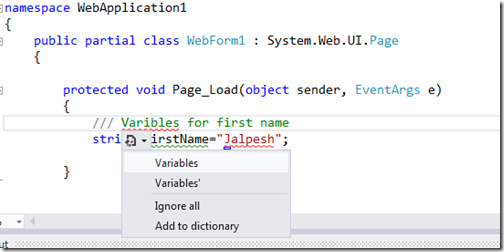
Spell Checker by Noah Richards:
http://visualstudiogallery.msdn.microsoft.com/7c8341f1-ebac-40c8-92c2-476db8d523ce
It’s provides spelling checks for almost all the files.
- Plain text files where entire file will be checked for incorrect spelling.
- Source code(.cs files)
- HTML/ASP files.
You can configure the color of the squiggle under misspelled words by changing the foreground color of Spelling Error (in Tools->Options->Environment->Fonts and Colors). The default color is red. Following is a example for that.

Wednesday, April 10, 2013
Why sometimes it’s not a good idea to use session variables in class library project.
As we all know web pages are stateless pages and we need to use session variables in web application to maintain some session over page. Some time we divide our application into multiple layers for example business logic layer,database layer etc. This all layers will be a class library projects.
So when you have your applications divided into the multiple layers at that time you might need to use session variables in the class library projects. For that we are adding System.Web namespace as a reference to a class library project and then we can use session with HttpContext object. That’s works fine if your layers are going to be used in web application projects. But for example if you have service oriented architecture and your services also access your class libraries via non standard protocol i.e. WCF Service hosted on TCP/IP bindings. At that time sessions will not work.
Instead of that you should always use the parameters in method and avoid direct use of session variables. That parameters will passed either from the web application or from the services which is calling the class libraries.
Hope you liked it. Stay tuned for more..
So when you have your applications divided into the multiple layers at that time you might need to use session variables in the class library projects. For that we are adding System.Web namespace as a reference to a class library project and then we can use session with HttpContext object. That’s works fine if your layers are going to be used in web application projects. But for example if you have service oriented architecture and your services also access your class libraries via non standard protocol i.e. WCF Service hosted on TCP/IP bindings. At that time sessions will not work.
Instead of that you should always use the parameters in method and avoid direct use of session variables. That parameters will passed either from the web application or from the services which is calling the class libraries.
Hope you liked it. Stay tuned for more..
My feed url changed
Before one year my blog has its own domain name www.dotnetjalps.com and at that time I did not changed the URL of my rss feeds. But now feed burner is providing me a way to change it without effecting my current subscribers so I have changed that to match my domain name.
Following is a new URL for my feeds.
http://feeds.feedburner.com/DotNetJalps
Please note that existing subscribers don’t have to change anything. Only the new subscribers will have that changed now.
Following is a new URL for my feeds.
http://feeds.feedburner.com/DotNetJalps
Please note that existing subscribers don’t have to change anything. Only the new subscribers will have that changed now.
Monday, March 25, 2013
ASP.NET 4.5 TextBox TextMode Property
Right now everybody is talking about HTML5 and its contains lots of new features like web sockets, canvas, new intput types with validation etc.
With HTML5 new input types is going to be one of coolest feature and in future more and more people are going to use that feature. So in asp.net 4.5 asp.net development team given a support via TextMode property enhancements.
In earlier versions of ASP.NET we used have only three properties for TextMode property of asp.net textbox control.
ASP.NET 4.5 text mode property enhancement:
In earlier versions of ASP.NET we used have only three properties for TextMode property of asp.net textbox control.
- MultiLine- for multiline textbox.
- Password- for password textbox
- SignleLine –for single line textbox
- Color- for Color entries
- Date- for date entries. You can enter dates only
- DateTime – for datetime entries with respect to local time zone.
- DateTimeLocal- for datetime entries with respect to local time zone.
- Email- for email address
- Month- for month and year entry.
- Number- for entering numeric values.
- Range- for containing range between two numbers.
- Search- for search field. A search field is like regular text fields
- Tel- for telephone number.
- Url- for website url entries. It will only contain urls.
- Week- for entering weeks and year.
Saturday, March 23, 2013
Difference between All and Any operator in linq
In this post we are going to learn about difference between ‘All’ and ‘Any’ operator in Linq.
All operator checks whether all elements have met specific conditions or not while Any operator check whether there is any elements exist in collection or not?
So what we are waiting for Let’s take a example.
Now let’s run that example. To see how its works.
Difference between ‘All’ and ‘Any’ operator:
So what we are waiting for Let’s take a example.
using System;
using System.Linq;

namespace ConsoleApplication1
{
    class Program
    {
        static void Main(string[] args)
        {
            int[] intArray = {1,2,3,4,5};
            bool result = intArray.All(i => i > 2);
            Console.WriteLine(result);
            result = intArray.Any();
            Console.WriteLine(result);
            Console.ReadLine();
        }
    }
}
In the above example you can see that I have created an integer array and then checked with both all and any operator. In first condition I have checked that whether elements are greater then 2 or not and same way I have checked with any operator that its contains any element or not?Now let’s run that example. To see how its works.
Friday, March 22, 2013
My blog post appears on asp.net community spot light
Once again my blog post about CRUD operations with asp.net and petapoco appears on the Microsoft asp.net official website. I would like to thank you all for specially Jon Galloway and asp.net team.

A big thank you for every one for supporting me.

A big thank you for every one for supporting me.
Saturday, March 16, 2013
All operator in linq
Few days back I came across “All” operator in Linq. I thought it will be good idea to write a blog post about it and share it with community.
It check the condition whether all the elements on collection matches given criteria and based on that it will return bool value. It can be useful in scenario where we need to do some kind of validation whether all the elements of collection matches with certain condition or not.
So Let’s take a simple example. Following is a code for that.
All operator in linq:
It’s almost similar to select it returns all the element in the input sequence with matching condition in given predicate. Following is syntax for All.public static bool All<TSource>( this IEnumerable<TSource> source, Func<TSource, bool> predicate)
It check the condition whether all the elements on collection matches given criteria and based on that it will return bool value. It can be useful in scenario where we need to do some kind of validation whether all the elements of collection matches with certain condition or not.
So Let’s take a simple example. Following is a code for that.
using System;
using System.Linq;

namespace ConsoleApplication1
{
    class Program
    {
        static void Main(string[] args)
        {
            int[] intArray = {1,2,3,4,5};
            bool result = intArray.All(i => i > 2);
            Console.WriteLine(result);
            result = intArray.All(i => i < 6);
            Console.WriteLine(result);
        }
    }
}Thursday, March 14, 2013
CRUD operations with PetaPoco and ASP.NET MVC
In this post we are going to see how we can do CRUD operations with ASP.NET MVC and PetaPoco Micro ORM.
Petapoco is a tiny ORM developed by topten software. As per them it’s a tiny, fast, single-file micro-ORM for .NET and Mono.
As per topten software it contains following features.
What is PetaPoco?
- Like Massive it's a single file that you easily add to any project
- Unlike Massive it works with strongly typed POCO's
- Like Massive, it now also supports dynamic Expandos too - read more
- Like ActiveRecord, it supports a close relationship between object and database table
- Like SubSonic, it supports generation of poco classes with T4 templates
- Like Dapper, it's fast because it uses dynamic method generation (MSIL) to assign column values to properties
Features of PetaPoco:
- Tiny, no dependencies... a single C# file you can easily add to any project.
- Works with strictly undecorated POCOs, or attributed almost-POCOs.
- Helper methods for Insert/Delete/Update/Save and IsNew
- Paged requests automatically work out total record count and fetch a specific page.
- Easy transaction support.
- Better parameter replacement support, including grabbing named parameters from object properties.
- Great performance by eliminating Linq and fast property assignment with DynamicMethod generation.
- Includes T4 templates to automatically generate POCO classes for you.
- The query language is SQL... no weird fluent or Linq syntaxes (yes, matter of opinion)
- Includes a low friction SQL builder class that makes writing inline SQL much easier.
- Hooks for logging exceptions, installing value converters and mapping columns to properties without attributes.
- Works with SQL Server, SQL Server CE, MySQL, PostgreSQL and Oracle.
- Works under .NET 3.5 or Mono 2.6 and later.
- Experimental support for
dynamicunder .NET 4.0 and Mono 2.8 - NUnit unit tests.
- OpenSource (Apache License)
- All of this in about 1,500 lines of code
Wednesday, March 13, 2013
Default focus and default button in asp.net
Sometimes ago a friend ask me how to put default focus and default button in ASP.NET. He was not knowing that there is property for that in form tag in asp.net. I thought it will be good idea to write a blog post about that.So those who are not aware of this feature can get an idea for that.
In some cases we need to have default button and default focus. For example take a example of a shopping cart registration form. Where you need to have default focus into the first textbox if you contain list of textboxes over there. Same way you can have more then one button on asp.net forms for example save and cancel so once user press enter which button should be pressed. On above both scenario this Default button and default features can come very handy.
From asp.net 2.0, The form tag has this two properties DefaultButton and DefaultFoucs where you can set the Id of control that you need as default button and same way you need to put Id of a control for default focus.
In some cases we need to have default button and default focus. For example take a example of a shopping cart registration form. Where you need to have default focus into the first textbox if you contain list of textboxes over there. Same way you can have more then one button on asp.net forms for example save and cancel so once user press enter which button should be pressed. On above both scenario this Default button and default features can come very handy.
From asp.net 2.0, The form tag has this two properties DefaultButton and DefaultFoucs where you can set the Id of control that you need as default button and same way you need to put Id of a control for default focus.
Sunday, March 10, 2013
How to consume ASP.NET WebAPI from jQuery
Before some months Microsoft has launched WebAPI framework for building and consuming HTTP services. This WebAPI can be called from anything like from mobile sites to JavaScript anything. I thought it will be a good idea to call a WebAPI from jQuery.
In this post I am going to explain how to consume ASP.NET WebAPI from jQuery.

Now once you click Ok. It will ask for type of project. You want to create you need to select Web API there.
In this post I am going to explain how to consume ASP.NET WebAPI from jQuery.
Creating a basic WebAPI:
To create a web API you need to install ASP.NET MVC 4.0 and then you create a new project for MVC .
Now once you click Ok. It will ask for type of project. You want to create you need to select Web API there.
Friday, March 8, 2013
Dependency graph in visual studio 2012- Understand your code better.
Today I came across a new feature of visual studio 2012 called Dependency Graph in visual studio 2012. I thought it will be good Idea to write a blog post about this.
I have written list of visual studio 2012 features post. You can find this at my Visual Studio 2012 page.
I have written list of visual studio 2012 features post. You can find this at my Visual Studio 2012 page.
What is Dependency Graph?
Dependency graph help you visualize how your code is written and organized and provide view on code dependencies. This is very useful when you are working with a code that you have not written. With the dependency graph you can easily get an idea of code written by others in a application.How to create Dependency Graph:
You can easily create dependency graph via architecture menu –>Generate Dependency graph. You will also presented to two options like below.- For Solution
- For Include file.
Thursday, March 7, 2013
SelectMethod in ASP.NET 4.5 Model binding
New version of ASP.NET provides lots of way of binding data to the data controls like Grid View, Repeater etc. You can now bind this controls with strong type. I have earlier written a blog post about How we can use Model binding with ASP.NET 4.5 and Visual Studio 2012.
In asp.net 4.5, It is also possible to bind controls with SelectMethod attribute. This method specify the data that you want to bind with data controls like grid view and repeater controls.
So what we are waiting for?? Let’s take an simple example. I have create a basic model class “Employee” like below.
SelectMethod in ASP.NET 4.5:
So what we are waiting for?? Let’s take an simple example. I have create a basic model class “Employee” like below.
public class Employee
{
    public int EmployeeId { get; set; }
    public string FirstName { get; set; }
    public string LastName { get; set; }
}
This class contains three properties EmployeeId,FirstName and LastName. Now I have created one method to get a generic list of employee model like following.Wednesday, March 6, 2013
Telerik JustCode review
Visual Studio is a great IDE and allow developers to design and code anything from windows application to web application. But it does not have a much code refactoring features so You need to have third party add in to make this happen. Telerik JustCode is one of them.
Recently I was contacted by Telerik team to review Telerik JustCode. So I installed Telerik Just code in my machine and I have used it for few days and Here is the my first impressions.
Recently I was contacted by Telerik team to review Telerik JustCode. So I installed Telerik Just code in my machine and I have used it for few days and Here is the my first impressions.
Things that I like about Telerik JustCode:
- It does not have impact on the Visual Studio load time.
- It does not change any theme or UI for the Visual Studio.
- Performance is much better then it’s competitors. It does not slow down visual studio while you were using it.
- Its not overwriting all things in Visual Studio like visual studio shortcuts.
- Another things its competitively priced then its competitors.
- Cloud Sync of your settings so you don’t have to worry about loosing your settings.
- Almost got all the features of code refactoring and code creation which are available with tools.
- Does not have annoying popups for suggestions or code refactoring.
Tip- InProc session state was not working with IIS7.5
In this post I am going to explain about reason for InProcsessionState was not working with IIS 7.5.
That was the reason for the session state was not working as “InProc” session state is using IIS memory to manage sessions. You can find more information about this in following link.
http://stackoverflow.com/questions/2147578/asp-net-session-state-and-multiple-worker-processes
1) You can use other session state mode like State Server or SQL server which supports multiple worker processes.
Problem:
Yesterday in one of my PC I got updated IIS 7.5 and suddenly after updating the IIS my ASP.NET application session state stopped working. It was a very weird behaviour and after doing some R and D I have found that my worker process per application was more then one.That was the reason for the session state was not working as “InProc” session state is using IIS memory to manage sessions. You can find more information about this in following link.
http://stackoverflow.com/questions/2147578/asp-net-session-state-and-multiple-worker-processes
Resolution:
There are two ways of resolving this problem.1) You can use other session state mode like State Server or SQL server which supports multiple worker processes.
Sunday, March 3, 2013
Page inspector in Visual Studio 2012
In this blog post we are going to learn about a new feature of Visual Studio 2012 called “Page Inspector”.
I have written whole series about new features of Visual Studio 2012. This post will also be part of it. You can find all post related to Visual Studio at my Visual Studio 2012 page. Following is a link for that.
Visual Studio 2012 Feature Series
I have written whole series about new features of Visual Studio 2012. This post will also be part of it. You can find all post related to Visual Studio at my Visual Studio 2012 page. Following is a link for that.
Visual Studio 2012 Feature Series
What is Page Inspector:
Page inspector is a great tool to inspect your page in Visual Studio itself. In other words, You can use Page Inspector as a browser and inspect your pages in Visual Studio itself. It’s really slow a common problem you can diagnose your page in visual studio itself. You can see where you UI comes from and even you can look into your page in HTML.Video about different searching options in visual studio 2012
I have created a video tutorial for Visual studio 2012. Where I have shown different kind of searching options.

Hope you like it. Stay tuned for more..
Wednesday, February 27, 2013
Internet explorer 10 for windows 7- What’s new
Recently before some time Scott Hanselman just announced Internet Explorer 10 for windows 7. Today it’s launch and I have just downloaded the and installed it. I thought you it would be a great idea to write a blog post about this.
http://windows.microsoft.com/en-us/internet-explorer/downloads/ie-10/worldwide-languages
Installation went very smooth You just need to restart the computer once IE 10 completely installed.
Download Internet explorer 10 for windows 7:
The first question comes to your mind that from where we can download internet explorer 10. Following is a link for that from where you can download the IE 10 for windows 7.http://windows.microsoft.com/en-us/internet-explorer/downloads/ie-10/worldwide-languages
Installation went very smooth You just need to restart the computer once IE 10 completely installed.
Sunday, February 24, 2013
HTML editor enhancement in visual studio 2012
In this post I am going to explain about HTML Editor Enhancement in visual studio 2012. I have been writing few post about Visual studio 2012 new features and this post will also be part of that. You can read whole series at following link.
Visual Studio 2012 feature series

Visual Studio 2012 feature series
Tag highlighting in Visual Studio 2012:
In visual studio 2012 You can highlight the start and end tag of a particular HTML element. One you click on starting tag of HTML element it will have other part highlighted just like following.
Saturday, February 23, 2013
Dotnetjalps.com- 551 blog posts and still counting!!
Today is one of the most important day for this blog as I am writing 551th blog post for this blog post. I can’t believe this..yeah this blog has completed 550 blog post.
Earlier I was just writing blog posts to make a repository of my code whatever I have done in my professional life. But when I came Ahmedabad at that time I understand the true value of blog and then I started taking it very seriously and started writing blog post that can help others and me to learn new things.
Then I brought my own domain last year http://www.dotnetjalps.com to create my own brand.
This blog is my journey of learning and I believe in this journey and continue to walk on it that’s why I have made title of this blog post still counting!!
People I like to thank:
First of all I like to thank my parents for whatever I am without them I could not even stand near where I am right now!!. Then I would like to thank my wife without her support it would not have been possible to write this 551 blog post..So thank you sweetheart. My younger brother who has been moral support for me whenever I feel low or something was not working my way. My little champ who give me all energy that I have. Whole MVP community and friends where I learn so many things and off course readers of this blog. Without readers this blog is not there where it is right now!!How I started blogging:
Actually I was not serious about blogging I just show a blog with blogspot domain and for curiosity I have also registered a blog actually at that time I have registered it with my name like http://jalpesh.blogspot.com. At that time I have no idea that what blog is. After registering blog for first month I have not done anything and one one day I just goggled my name and I found my blog listing over there even if I have not written anything. I feel excited and decided I should write some thing and that’s how I have started writing.Earlier I was just writing blog posts to make a repository of my code whatever I have done in my professional life. But when I came Ahmedabad at that time I understand the true value of blog and then I started taking it very seriously and started writing blog post that can help others and me to learn new things.
Then I brought my own domain last year http://www.dotnetjalps.com to create my own brand.
This blog is my journey of learning and I believe in this journey and continue to walk on it that’s why I have made title of this blog post still counting!!
Thursday, February 14, 2013
Default keyword in c#
In this post, I am going to explain about default keyword in c#.
The basic syntax of default is default(T) where t is any reference type of value type and If T is a value type, whether it will be a numeric value or struct.
We can use it to assign default value to nullable types like below.
Here output will be.
Introduction:
As per MSDN default keyword in C# used to assign the default value of the type. In some situation its comes very handy where we don’t want to create object and directly assign the default value of it.The basic syntax of default is default(T) where t is any reference type of value type and If T is a value type, whether it will be a numeric value or struct.
Default Keyword usage:
We can use Default keyword in variety of cases.Assigning value to nullable Type:
using System;

namespace ConsoleApplication3
{
    class Program
    {
        static void Main() {
            int? i = default(int);
            Console.WriteLine(i);
        }
    }
}
Here output will be.
Wednesday, February 13, 2013
How to convert a list into array with Linq
In this post, I am going to explain how we can convert an generic list to simple int array with Help of Linq. Recently, I was working on an application and there I needed an Int array of for list of ids in generic list. I tried various methods and then with the help of ‘Select’ operator and ToArray method I have easily converted an generic list to the int array.
Lets take a simple example. I need a contact id list from a generic list of contacts and following is my contact class.
Now I have created a new GetContacts methods to create a new Generic List of Contacts.
Lets take a simple example. I need a contact id list from a generic list of contacts and following is my contact class.
public class Contact
{
    public int ContactId { get; set; }
    public string Name { get; set; }
}
Now I have created a new GetContacts methods to create a new Generic List of Contacts.
Thursday, February 7, 2013
Redirection with ASP.Net friendly URLs
In this post we are going to see how we can use Response.Redirect(Redirecttion) in asp.net friendly URLs. Before some day I have written a post about ASP.NET Friendly URLs – Cleaner, SEO friendly URLs. On that post one reader ‘Ramesh’ asked me that how we can do redirection with ASP.Net friendly URLs. So this post is in reply to Him.
Uh!! don’t believe me!!. Let’s take a sample example. I am going to use by default template with ASP.NET Friendly URLs. So for this example I have created a ASP.Net button in Default template AboutUs.aspx page. Once the click of that button we are going to use ‘Response.Redirect’ for redirection and redirect this page to Contact Page. Following is a html code for that button.
How to redirect a page to ASP.Net friendly URLs:
Actually!! there is nothing to learn. It’s very easy You can directly use the ‘Response.Redirect’ with the ASP.Net friendly URLs. The NuGet Package itself takes care of all the things. You just need to write the route name as a parameter in ‘Response.Redirect’ and you are done!!Uh!! don’t believe me!!. Let’s take a sample example. I am going to use by default template with ASP.NET Friendly URLs. So for this example I have created a ASP.Net button in Default template AboutUs.aspx page. Once the click of that button we are going to use ‘Response.Redirect’ for redirection and redirect this page to Contact Page. Following is a html code for that button.
Monday, February 4, 2013
ASP.NET Friendly URLs – Cleaner, SEO friendly URLs
Search Engine optimization is one of the key factor for your site. If you spend millions of dollars on making your website looks good and bug free then also its possible that you will not get attention of search engine because of your URLs. For example you’re having shopping cart created in asp.net and you have not optimized your URL then it will look like following.
www.foo.com ?Product.aspx?Category=1& Page=1
If you search engine read this URL then search engine will not know much about this URLs. Even normal people who does not know querystring menaing(?Category=watch&Page=1) will not understand it. But If you have URL like following.
www.foo.com/prduct/category/watch/page/1
It’s easy to read and search engine and normal people will know that you are loading products that belongs to category watch and this is a first page.
www.foo.com ?Product.aspx?Category=1& Page=1
If you search engine read this URL then search engine will not know much about this URLs. Even normal people who does not know querystring menaing(?Category=watch&Page=1) will not understand it. But If you have URL like following.
www.foo.com/prduct/category/watch/page/1
It’s easy to read and search engine and normal people will know that you are loading products that belongs to category watch and this is a first page.
Sunday, February 3, 2013
What’s new in ASP.NET and Web Tools 2012.2 Release Candidate
Recently before some time, Scott Gu announced ASP.NET and Web Tools 2012.2 Release Candidate. I have downloaded it and used it for a while and I have found following new things.
ASP.NET Enhancements:
- New facebook asp.net mvc template is there. Creating facebook application with asp.net mvc become very easy. In just a few step you can easily create facebook application and get data of users and friends of facebook.
- Real Time Signal R support is there. You can easily create chat kind of applications with it. You can also take advantage of new web socket in .NET 4.5.
- New updates with ASP.NET WEB Api now supports OData, Integrated tracing and automatically generating help document for your api
- ASP.NET Friendly URLs: This feature makes developers life very easy with creating SEO friendly and cleaner looking URLs with out .aspx extension. The Friendly URLs feature also makes it easier for developers to add mobile support to their applications with support for mobile .ASPX pages and supporting switching between desktop and mobile views. It can be used with existing ASP.NET v4.0 applications
- Enhancement to Web publishing
- All new single page application template with knock out JavaScript library and restful UI.
Saturday, February 2, 2013
How to hide title bar in jQuery UI modal dialog?
jQuery UI is a great open source set of user controls and it’s very easy to use. Recently one of my friend asked question that how we can hide title bar in jQuery UI Dialog? so this post is a reply to him. Let’s create a simple html and use jQuery Ui modal dialog. Following is a code for that.
Here in the above code you can see I have create a hello world pop up with asp.net jQuery CDN.
Here in the above code you can see I have create a hello world pop up with asp.net jQuery CDN.
<html>
<head>
    <title>Hello World  Popup</title>
    <link type="text/css" href="http://ajax.aspnetcdn.com/ajax/jquery.ui/1.10.0/themes/smoothness/jquery-ui.css"
        rel="stylesheet" />
    <script language="javascript" src="http://ajax.aspnetcdn.com/ajax/jQuery/jquery-1.9.0.min.js"></script>
    <script language="javascript" src="http://ajax.aspnetcdn.com/ajax/jquery.ui/1.10.0/jquery-ui.min.js"></script>
    <script type="text/javascript">
        function Show() {

            $("#dialog:ui-dialog").dialog("destroy");

            $("#dialog-modal").dialog({
                height: 300,
                width: 200,
                modal: true
            });
        }
    </script>
</head>
<body>
    <div id="dialog-modal" title="Hello Word" style="display: none">
        Hello World Juqry UI popup
    </div>
    <input type="button" onclick="javascript: Show()" value="click me" />

</body>

</html>
How to create overload methods in WCF service with C#
Before some days I have posted an blog about How to create overloaded web methods in asp.net web service? In this post I am going to explain how we can create overload methods in WCF(Windows Communication Foundation) service with C# language.
So let’s consider same Hello world example which we have used web service overload method. Let’s create two methods HelloWorld one is with name and another is without parameter. For WCF service we have to first create interface following is a code for that.
So let’s consider same Hello world example which we have used web service overload method. Let’s create two methods HelloWorld one is with name and another is without parameter. For WCF service we have to first create interface following is a code for that.
Friday, February 1, 2013
Getting started with Twitter Bootstrap and ASP.Net MVC
Update: Now with ASP.NET MVC5 you don't need to install twitter bootstrap nuget package now its by default available with default template.
In this blog I am going explain how we are going integrate Twitter Bootstrap library with ASP.Net MVC.
What is Twitter bootstrap:
Twitter Bootstrap is open source library created by Twitter. As per twitter it’s Sleek, intuitive, and powerful front-end framework for faster and easier web development. It’s full featured framework for creating web sites. It includes CSS framework, JavaScript, JavaScript plug-ins,typography, Html scaffolding. There are lots of themes also available that are available so you can use that right away.Integrating Twitter bootstrap with ASP.Net MVC:
Earlier we have to manually integrate Twitter bootstrap into the ASP.NET MVC like here. But now We have Twitter.Bootstrap.MVC4 Nuget packages that saves lots of time to adding bootstrap to MVC4 template. It’s very easily combines bootstrap into ASP.NET MVC application thanks to it’s authors Matt Hinze and Eric Hexter.As per Eric Hexter It’s provide following features.
- JS and CSS bundling/minification of Twitter Bootstrap files the MVC4 way
- Incorporate a jQuery validation fix to work with the bootstrap javascript
- Razor Layout templates using Twitter Bootstrap markup.
- Menus using Navigation Routes, including submenus and hiding menus by context(logged in vs anonymous)
- Runtime Scaffolding – default Index, Edit and Detail views.. You provide thePOCOs and we will render the CRUDviews.
- Post Redirect Getsupport using the Bootstrap Alert styles.
- A Sample to show how to use all of this stuff
SelectMany operator in Linq C#
SelectMany is an important operator in Linq. It takes each element of a sequence to an IEnumerable and flattens the resulting sequences into one sequence. You can find out more information about different overload list from the below link.
http://msdn.microsoft.com/en-us/library/system.linq.enumerable.selectmany.aspx
In this post I am going to explain How it can be really useful when you want to find list related to two entities. Practical example will be like a person can have multiple address and if you want to find list of addresses that are used with person then this SelectMany operator can be really useful.
So for this example First, I have create Address class with Street and Postalvcode property
http://msdn.microsoft.com/en-us/library/system.linq.enumerable.selectmany.aspx
In this post I am going to explain How it can be really useful when you want to find list related to two entities. Practical example will be like a person can have multiple address and if you want to find list of addresses that are used with person then this SelectMany operator can be really useful.
So for this example First, I have create Address class with Street and Postalvcode property
public class Address
{
    public string Street { get; set; }
    public string PostalCode { get; set; }
}Wednesday, January 30, 2013
How to create overloaded web methods in asp.net web service?
Recently some of colleagues were discussing about how to create overload methods in web service. We can’t directly create overloaded method web methods for web service. So I thought It would be great idea to write a blog post about it.
Function overloading is one of most known concepts of Object Oriented Programming. It’s a technique to implement polymorphism in code. Like in other programming language in c# you can also create multiple functions with same name and different argument. In function overloading function call will be resolved by ‘Best Match Technique’.
To understand this let’s create a simple web service with two HelloWorld Methods one with parameter and one without parameter both will return a string. Following is a code for that.
Function Overloading:
Problem: You cannot directly overload method in web service:
Tuesday, January 29, 2013
Visual studio 2012 color editor- Make Visual studio 2012 Colorful
This blog will be part of visual studio 2012 features series.
I personally like the Metro UI for Visual Studio 2102 but still some people are not happy with it. They really like Old Visual Studio 2010 layout and they wanted to have same kind of color in visual studio 2012. For those who want to change the color of Visual studio there is a plug in called Visual Studio 2012 Color Theme editor. From which you can set colors for visual studio UI and make your visual studio look colorful. Following is a link for that.
http://visualstudiogallery.msdn.microsoft.com/366ad100-0003-4c9a-81a8-337d4e7ace05
Once you download that from above location and click on installer it will ask for accepting terms and conditions like following.
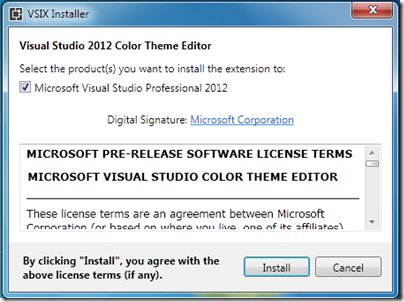
I personally like the Metro UI for Visual Studio 2102 but still some people are not happy with it. They really like Old Visual Studio 2010 layout and they wanted to have same kind of color in visual studio 2012. For those who want to change the color of Visual studio there is a plug in called Visual Studio 2012 Color Theme editor. From which you can set colors for visual studio UI and make your visual studio look colorful. Following is a link for that.
http://visualstudiogallery.msdn.microsoft.com/366ad100-0003-4c9a-81a8-337d4e7ace05
Once you download that from above location and click on installer it will ask for accepting terms and conditions like following.

Sunday, January 27, 2013
C# null-coalescing operator ??
C# language provides many features and null-coalescing operator(??) is one of them. It’s a great operator to check whether object is null and if it is null then it will provide a default value. I have seen most of the people are not using while it’s a great feature. So I decided to write a blog about this.
You can find more information about null-coalescing operator from the below link.
http://msdn.microsoft.com/en-us/library/ms173224.aspx
You can find more information about null-coalescing operator from the below link.
http://msdn.microsoft.com/en-us/library/ms173224.aspx
Tip-Convert array to Comma delimited string
I was needed to convert an string array into the comma delimited string and the old way to do that is too with for loop. But I was sure that there should be some ready made function that will do this very easily.
After doing some research I have found string.Join. With the help of this we can easily an array into the comma delimited string.
String.join have two arguments one is separator and other one is either array or enumerable.
Following is a code for that.
After doing some research I have found string.Join. With the help of this we can easily an array into the comma delimited string.
String.join have two arguments one is separator and other one is either array or enumerable.
Following is a code for that.
namespace ConsoleApplication3
{
    class Program
    {
        static void Main() {
            string[] name = {"Jalpesh", "Vishal", "Tushar", "Gaurang"};
            string commnaDelmietedName = string.Join(",", name);
            System.Console.WriteLine(commnaDelmietedName);
        }
    }
}
Friday, January 18, 2013
Linq performance with Count() and Any()
Recently I was using resharper to refactor some of my code and found that it was suggesting to use any() extension method instead of count() method in List<T>. I was really keen about performance and found that resharper was right. There is huge performance difference between any() and count() if you are using count() just to check whether list is empty or not.
In Count() method code will traverse all the list and get total number of objects in list while in Any() will return after examining first element in the sequence. So in list where we have many object it will be significant execution time if we use count().
Difference between Count() and Any():
How to get N row from datatable in C#
Problem:
Possible Solutions to problem:
- With normal for loop
- With lamda expression and linq
1. With normal for loop:
Following is code from where we can get 3 rows of data table.Thursday, January 17, 2013
New Milestone for Dotnetjalps.com-500000 visits for my blog
Today I got great news from sitemeter.com that my blog http://www.dotnetjalps.com completed 500,000 visitors for my blog. This is a new milestone achieved for this blog and I would like to thank all my blog readers for making this blog this much bigger.
On this occasion I would like to thanks all supporters, friends and my family members who have faith in me and believe that I could do something and this all because of them and my blog readers.
Followings are my statistics for my blog.
On this occasion I would like to thanks all supporters, friends and my family members who have faith in me and believe that I could do something and this all because of them and my blog readers.
Followings are my statistics for my blog.
Saturday, January 5, 2013
Search and filters available in visual studio 2012
I have already written lots of post about Visual Studio 2012 features and this post is also going to be part of that series. You can get whole series of post from the following link.
Visual Studio 2012 features
In this post we are going to talk about search and filters provided into the visual studio 2012. There are lots of emphasis there in search and filters in visual studio 2012.You can almost search every thing including errors also. There are different search options are available for that.
Prior to previous edition in visual studio 2012 there was quick launch search given at the top of the visual studio. From here you can search for anything in solutions and even menu’s also. It will provide you a quick launch for that.
Visual Studio 2012 features
In this post we are going to talk about search and filters provided into the visual studio 2012. There are lots of emphasis there in search and filters in visual studio 2012.You can almost search every thing including errors also. There are different search options are available for that.
Quick launch search in visual studio:
Friday, January 4, 2013
Lazy<T> in C# 4.0
Before C# 4.0 there was no on demand initialization by default. So at the time of declaration we need to create a value or object will be null or we have to create on demand initialization via coding.. But with C# 4.0 we now have lazy class. As per MSDN it support lazy initialization so it means if we use lazy class then it will initialize the object at the time of demand.
It is very useful for UI responsiveness and other scenario's. Lazy initialization delays certain initialization and it’s improve the start-up time of a application. In the earlier framework if we need this kind of functionality we have to do it manually via coding but from C# 4.0 onwards it have Lazy<T> class. With the Help of this we can improve the responsiveness of C# application. Following is a simple example.
It is very useful for UI responsiveness and other scenario's. Lazy initialization delays certain initialization and it’s improve the start-up time of a application. In the earlier framework if we need this kind of functionality we have to do it manually via coding but from C# 4.0 onwards it have Lazy<T> class. With the Help of this we can improve the responsiveness of C# application. Following is a simple example.
Sunday, December 30, 2012
Lock keyword in C#
As we have written earlier we have now multi-core CPU for our computers and laptops and to utilize that we need to use threading in code. Now if we create thread and access same resource at same time then it will create a problem at that time locking become quite essential in any programming language.
Let’s consider a scenario. We are having a small firm of computers and each computer is shared by two employees and they need to use computer for putting their sales data in excel sheet. So they can not work together at same time and one has to work and other has to wait till first one complete the work. Same situation can be occurred in programming in where we are using same resource for multiple thread.
C# provides locking mechanism via lock keyword. It restricts code from being executed by more then one thread at a time. That is the most reliable way of doing multi threading programming.
Let’s consider a scenario. We are having a small firm of computers and each computer is shared by two employees and they need to use computer for putting their sales data in excel sheet. So they can not work together at same time and one has to work and other has to wait till first one complete the work. Same situation can be occurred in programming in where we are using same resource for multiple thread.
C# provides locking mechanism via lock keyword. It restricts code from being executed by more then one thread at a time. That is the most reliable way of doing multi threading programming.
Thursday, December 27, 2012
Merry Christmas to all my readers
This is not a usual technical post I am writing here. I just wanted to take a moment and wishing you Merry Christmas and happy holidays. All readers are has been great support to this blog and on this occasion I want thank you guys for all the support and love you have shown during this year 2012. I have achieved so much through this blog and its been not possible without your support.
I wish that year 2013 will bring you all joy and happiness you required. May all your wishes fulfil.

Stay tuned for more. I have lots of stuff for you in 2013. Till then happy holidays!! and once Merry Christmas to you and your family.
I wish that year 2013 will bring you all joy and happiness you required. May all your wishes fulfil.

Stay tuned for more. I have lots of stuff for you in 2013. Till then happy holidays!! and once Merry Christmas to you and your family.
Friday, December 21, 2012
Where I can find SQL generated by Linq-To-SQL
Yesterday I have written a blog post about Where I can find SQL Generated by Entity Framework? and same day I got request from one of the our reader Ramesh that how I can find SQL generated by Linq-To-SQL?. I thought its a good idea to write a blog post to share amongst all who need this instead of reply in comments. In this post I am going to explain how we can get SQL generated by Linq-To-SQL.
For this post I am going to use same table like following. A customer table with two columns CustomerId and CustomerName.

For this post I am going to use same table like following. A customer table with two columns CustomerId and CustomerName.
Thursday, December 20, 2012
Where I can find SQL Generated by Entity framework?
Few days back I was optimizing the performance with Entity framework and Linq queries and I was using LinqPad and looking SQL generated by the Linq or entity framework queries. After some point of time I got the same question in mind that how I can find the SQL Statement generated by Entity framework?
After some struggling I have managed to found the way of finding SQL Statement so I thought it would be a great idea to write a post about same and share my knowledge about that. So in this post I will explain how to find SQL statements generated Entity framework queries.
To demonstrate the idea Let’s a very simple console application with C# and then create a table called ‘Customer’ with CustomerId and CustomerName field in sql server.
After some struggling I have managed to found the way of finding SQL Statement so I thought it would be a great idea to write a post about same and share my knowledge about that. So in this post I will explain how to find SQL statements generated Entity framework queries.
To demonstrate the idea Let’s a very simple console application with C# and then create a table called ‘Customer’ with CustomerId and CustomerName field in sql server.
Tuesday, December 18, 2012
Caller Info Attributes in C# 5.0
In c# 5.0 Microsoft has introduced a Caller information attribute. It’s a new feature that is introduced in C# 5.0 and very useful if you want to log your code activities. With the help of this you can implement the log functionality very easily. It can help any programmer in tracing, debugging and diagnostic of any application.
With the help of Caller Information we can get following information over there.
With the help of Caller Information we can get following information over there.
- CallerFilePathAttribute: With help of this attribute we can get full path of source file that contains caller. This will be file path from which contains caller at compile time.
- CallerLineNumberAttribute: With the help of this attribute we can get line number of source file which the method is called.
- CallerMemberNameAttribute: With the help of this attribute we can get the method or property name of the caller.
Sunday, December 16, 2012
Parallel task in C# 4.0
In today’s computing world is all about Parallel processing. You have multicore CPU where you have different core doing different work parallel or its doing same task parallel. For example I am having 4-core CPU as follows. So the code that I write should take care of this. C# does provide that kind of facility to write code for multi core CPU with task parallel library. We will explore that in this post.


Sunday, December 2, 2012
Dynamic URL of asp.net web service with web reference
It’s been a while I am writing this. But never late.. So I am writing this. Before some time one of friend asked about the URL of web service when we add reference. So I am writing this. Some of you may find this very basic but still many of people does not know this that’s why I am writing this.
In today’s world we have so many servers like development, preproduction and production etc. and for all the server location or URL of web service will be different.But with asp.net when you add a web reference to your web application it’s create a web reference settings in web.config where you can change this path. So it’s very easy to just change that path and you don’t have to add web reference again.
In today’s world we have so many servers like development, preproduction and production etc. and for all the server location or URL of web service will be different.But with asp.net when you add a web reference to your web application it’s create a web reference settings in web.config where you can change this path. So it’s very easy to just change that path and you don’t have to add web reference again.
Wednesday, October 10, 2012
Dark Visual Experience in Visual Studio 2012
I have written whole series related to Visual Studio 2012 features and this post will also be part of same series.You can get all my post related to visual studio from the following link.
Visual Studio 2012 feature series
Before some days I was searching something and found a great way to change the visual experience of visual studio 2012. I found that there are two type of themes available in visual studio 2012 light and dark under Tools->Option-> General environment value. This is one of newest feature I have found in visual studio 2012.

Visual Studio 2012 feature series
Before some days I was searching something and found a great way to change the visual experience of visual studio 2012. I found that there are two type of themes available in visual studio 2012 light and dark under Tools->Option-> General environment value. This is one of newest feature I have found in visual studio 2012.


