Thursday, April 7, 2011

Important milestone achieved. This is my 400th Blog post

When I started this blog before four Years I was not serious about blogging. I was just started this blog to register domain against my name. After a while I was inspired by great community bloggers like ScottGu,Pinal Dave,Jacob Sebastian and some other friends like Vivek Patel. Then I started blogging seriously but at that time I was not aware of how to blog. I was just writing whatever I like or whatever I have found. I have no idea of syntax highlighting, blogging technique and SEO. Day by day I learned a lot and started working on things and as a Result of it Today I got 400th Blog post on my this blog.

I would like to thanks each and every reader and my fellow community blogger to helping me achieve this. Without them I could not achieve this.

Still I have seen there are lots of exceptional developers who are not writing blog. I would like to recommend that please read my blog post “Why a developer should blog?”. I must say once again that If you are doing great work then you should share it with the community and get their views of what you are doing.

On this occasion I would love to share some thoughts on blogging like following.
  1. Do not write blog to increase your blog post or get any recognition . Instead of this write your blog for self pride and community.
  2. Do no worry about who is going to read this blog. How you can increase your readers instead of that keep writing blogs and one day you will achieve whatever you like to do. Read your blog post once you posted it on your blog and it will give you great joy and satisfaction.
  3. keep inspired by your fellow community bloggers and try to improve your blogging.
  4. If you are technical blogger then Keep your post to give a complete solution of a problem because if readers will not get complete solution then they got frustrated with you.
  5. Learn and explore new things and share you experience on you blog.
  6. Always be good listener and you will learn a lot.
  7. Nobody knows everything. We all are learning everyday something so keep doing mistakes but learn from those mistakes and try to not repeat the same mistakes again.
Statistics of my blog:

On this occasion I would like to share my statistics of blog below are my statistics of blogStastics

Once again I would like to thank the readers and all the fellow bloggers without them it was not possible to achieve this. Keep blogging.. Stay tuned for more..

Shout it
Share:

Checking whether page is secure or not in ASP.NET or JavaScript

Recently in one the project we require to check whether page is secure or not as we are going to open a new popup window from that page and that why we need to pass https protocol if we have that page secure. I have search lots of things on internet and I have found following ways of finding whether page is secure or not in ASP.NET or JavaScript.

In ASP.NET There are two way of doing it. Either we can use current request to check whether it is secured or not or we can use server variables to check whether it it secure or not just like following.

HttpContext.Current.Request.IsSecureConnection
Here in above code If this returns true then Page is secured otherwise it is not Or you can use following server variable to check the protocol.
Request.ServerVariables["SERVER_PROTOCOL"];
In JavaScript you can document.location.protocol to check whether page is secure or not. Just like following.
document.location.protocol=='https:'
So you can see its very easy to check whether page is secure or not. Hope you liked it… Stay tuned for more..
Shout it
kick it on DotNetKicks.com
Share:
Tuesday, April 5, 2011

NuGet Version 1.2 released

Someday ago Phil Haack from Microsoft has released the newer version of Nuget. There will be new exe for the newer version of the NuGet. Those who does not know about NuGet please visit my earlier post about NuGet

Followings are some new features of NuGet 1.2.

  1. Framework profile support
  2. Automatically add binary redirects
  3. Specifying Framework Assembly References (GAC)
  4. Nuget.exe is now able to store API key credentials.
  5. Package Explorer
To know about all the features in details please visit following link.

http://nuget.org/announcements/nuget-1.2-released

You can update to this version via following command.

NuGet.exe u


Shout it
kick it on DotNetKicks.com
Share:
Monday, March 28, 2011

Implementing dependency injection pattern in .NET

Dependency injection pattern is a Software and Architecture designing technique that enables to us to separation of concerns,Modules,Classes and Extensibility of Software Development Project. It enables developer to reduce the complexity of project and you can also add new features to software without modifying whole structures. Let’s first understand how dependency injection is important and why we need it.

Why we need dependency inejction?


Let’s a take two class example of shopping cart. I am having two classes ProductDAL and ProductBLL.Here ProductDAL class represent whole data access Methods while ProductBLL implements whole Business logic in software. In normal scenario what we are doing do we will create a new object ProductDAL classes and then we will use that class for our database operations like below.
Public Class ProducDAL
{
 //Methods for database operations
}

Public Class ProductBLL
{
 ProductDAL objectProductDAL=new ProductDAL();

 //Methods for business logic where we are going to use DAL class
}
As you can see in above scenario we will have tight coupling because here we have created the new object of ProductDAL class and we can only change that if we change the container class ProductBLL. This will not help if we need to extend software after sometime and we need to modify the BLL without modifying existing class.So here comes dependency injection in picture. You can use dependency injection in this kind of scenario.

Ways of implementing Dependency Injection:


There are three ways of implementing dependency injection pattern.
  1. Constructor Injection.
  2. Setter Injection.
  3. Interface base Injection

Constuctor Injection:


In this kind of injection we can use constructor parameters to inject dependencies. Like following.
Interface IDAL
{

}

public class ProductDAL:IDAL
{
 //implement the methods of IDAL
}

public class ProductBLL
{
 private IDAL myDalObject;

 public ProducttBLL(IDAL iDal)
 {
     myDalObject=iDAL;
 }

 //use myDalObject to implement business logic
}
Here you can see in above example I have created a Interface IDAL and that interface contains the all method of Data Access Layer. Now we have ProductDAL class which implements that interface. So now you can create object of ProductBLL class like following.
ProductDAL objProductDAL=new ProductDAL();
PrductBLL objProductBLL=new ProductBLL(objProductDAL);
Here you can see you can pass any class as parameter in ProductBLL class which implements IDAL interface. Its not a concrete object so you can change implementation of ProductDAL class without changing ProductBLL class.

Setter Injection:


In this way we can create public property of Interface and then we can use that property to define the object of ProductDAL class like following.
Public Class ProductBLL
{
 IDAL _myDalObject;

 Pulibc IDAL myDalObject
 {
     get
     {
         return _myDalObject;
     }
     set
     {
         _myDalObject=value;
     }
 }
}
So here you can use property to initialize the ProductDAL class like following.

Infterface Injection:


In this section we can have a Method which will have interface as parameter and that will set object of ProductDAL class.
Public Class PrductBLL
{
 IDAL _myDALObject;

 public IntializeDAL(IDAL dalOjbect)
 {
     _myDALOjbect=dalObject;
 }
}
This is same as constructor injection except that this will intialize object after we call this IntializeDAL method like following.
ProductDAL objProductDAL=new ProductDAL();
PrductBLL objProductBLL=new ProductBLL();
objProductBLL.IntializeDAL(objProductDAL);
Hope you liked it. Stay tuned for more.. Happy programming…

Share:

Three new Action Result Type in ASP.NET MVC 3

In ASP.NET MVC incoming browser request mapped to a controller’s action method and that action method returns type of ActionResult in response to the browsers request. I was playing bit with ASP.NET MVC3 to check out new features of ASP.NET MVC 3 and I have found three great new ActionResult Type. Below is details explanation of each one.

  1. HttpNotFound: This return type returns a error 404 on client. This action result type can be very useful when we have resources that are not found and so we can notify the client with 404 error.
  2. RedirectResult:This returns a temporary redirect code 302 or permanent redirect code 302 depending upon a Boolean flag. This kind of redirection is very important for Search Engine optimization. I have already discussed this feature with asp.net 4.0 here.
  3. HttpStatusCodeResult: Returns a user specified code so developer have choice to return specific error code.

Here are code example of Action ResultType how we can use that in code.

public ActionResult SpecificResult()
{
return new HttpStatusCodeResult(404);
}

public ActionResult NotFound()
{
return HttpNotFound();
}

public ActionResult PermanentRedidrect()
{
return new RedirectResult("http://jalpesh.blogspot.com");
}
Hope you liked it.. Stat tuned for more..Happy Programming
Technorati Tags: ,
Shout it
kick it on DotNetKicks.com
Share:

My blog post is appearing on Microsoft Official ASP.NET site.

Today I got a surprise from the Microsoft. One of my friend Hajan Informed me that my blog post is appearing on the Microsoft Official asp.net site www.asp.net. This is great surprise and honor for me that my blog post are appearing on Microsoft official site.

MicrosoftASP.NET

I would like to thanks all the peoples who are supporting me and all the people who are their to correct me If I am wrong. Thank you once again!!. I will continue to writing my blogs to serve community and this kind of encouragement give more boost for writing blogs.

Stay tuned for more.. I will keep writing.. Thank you readers..

Technorati Tags: ,
Shout it
Share:
Wednesday, March 23, 2011

Working with more then one web.config files in asp.net application.

Recently one of reader of my blog how we can work with more then one web.config files in asp.net application. So I decided to blog about that. Here is the my reply for that.

You can work with more then one web.config file in asp.net. But you can not put more then one web.config in each folder. Let’s first understand the hierarchy of web.config and other configuration file settings. On the top of the every configuration files you will have machine.config file which will have all system wide configuration settings.You can find this file in your OS drive like C: /windows/Microsoft.NET/vFrameworkNumber/Config folder. Here framework number with what ever framework you are using 1.1/2.0 or 4.0. You can override those settings in web.config file at the your application root folder. Same way you can add more web.config file in subfolder and can override the setting of parent folder web.config file. So we will hierarchy like below.

Hirerchay

Now let’s Create Project for it. In that I have create two web.config and 2 pages. First I have putted the web.config in root folder and then I have putted web.config in subfolder. Same way I have created a sub folder and then I have putted the web.config in sub folder. I have also putted one asp.net page in root as well as subfolder to use respective web.config settings. Here are my folder structure like below.

FolderStructure

Below is code for root folder web.config

<?xml version="1.0"?>
<configuration>
<system.web>
<compilation debug="true" targetFramework="4.0" />
</system.web>
<appSettings>
<add key="root" value="This is from root web.config"></add>
<add key="MySetting" value="This my settings is from root web.config"></add>
</appSettings>

</configuration>

and following is code for sub folder web.config.

<?xml version="1.0"?>
<configuration>
<system.web>
</system.web>
<appSettings>
<add key="sub" value="This is from sub web.config settings"></add>
<add key="MySetting" value="This my settings is from sub folder web.config"></add>
</appSettings>
</configuration>


After that I have written a code in root asp.net page to print settings from web.config folder like this following.

using System;
using System.Collections.Generic;
using System.Linq;
using System.Web;
using System.Web.UI;
using System.Web.UI.WebControls;

namespace MoreWebConfig
{
public partial class Root : System.Web.UI.Page
{
protected void Page_Load(object sender, EventArgs e)
{
Response.Write(System.Web.Configuration.WebConfigurationManager.AppSettings.Get("Root"));
Response.Write("<BR>");
Response.Write(System.Web.Configuration.WebConfigurationManager.AppSettings.Get("MySetting"));

}
}
}

Same way I have wrriten code in subfolder like following.

using System;
using System.Collections.Generic;
using System.Linq;
using System.Web;
using System.Web.UI;
using System.Web.UI.WebControls;

namespace MoreWebConfig.SubFolder
{
public partial class SubFolderPage : System.Web.UI.Page
{
protected void Page_Load(object sender, EventArgs e)
{
Response.Write(System.Web.Configuration.WebConfigurationManager.AppSettings.Get("Sub"));
Response.Write("<BR>");
Response.Write(System.Web.Configuration.WebConfigurationManager.AppSettings.Get("MySetting"));

}
}
}

Now let’s run the both pages in browser one by one and you can see root folder application page is fetching settings from root folder web.config while sub folder application page is fetching setting from subfolder web.config even if key ‘mysetting’ is same on both as expected. You can see out put in browser below.

Root.aspx

Root

SubFolderPage.aspx

SubFolder

So it’s very easy to work with multiple web.config. The only limitation of this you can not access sub folder web.config settings from root folder page. Except all you can use anything. Hope you liked it. Stay tuned for more..Happy programming..


Technorati Tags: ,
Shout it
kick it on DotNetKicks.com
Share:
Monday, March 14, 2011

TSQL Quiz 2011 on beyondrelational.com

One of the my friend Jacob Sebastian running a SQL Server TSQL quiz on his site beyondrelational.com. This is a great opportunity to learn TSQL and win great price Like Apple IPad and other lots of cool stuff. So if you are expert and if you learning TSQL then its a great way to test your knowledge.

For whole month of march selected quiz master will ask a question and you have to answer all this question day by day and at the end of month you will have great chance to win Apple Ipad.

For more details you can visit following link:

http://beyondrelational.com/quiz/SQLServer/TSQL/2011/default.aspx

Hope you liked it.Stay tuned for more..

Shout it
Share:
Tuesday, January 25, 2011

Installing Nuget package with package manager console step by step overview.

I have already blogged about NuGet in earlier post about how to install NuGet packages to your project with wizard. NuGet Extension also provides an package manager console to add library to your projects. Let’s install a blogml package via package manager console. So if you still not installed NuGet exntension then please read my earlier post here that explains how to install the NuGet Extension.

Once you are done with installing NuGet Extension to go to package manager console. You have to click Tools->Library package manager –>Package Manager console like following.

PcakgeManagerConsole

Once you click that menu you will get package manager console like following. PackageManagerConsolewindow

One you load an command line is available to you just need to write command to find packages and then you need to write command to install packages. let’s first see how many packages are available with the NuGet Extension. So first you have to write ‘get-package –remote’ command in command line to see what packages are available as following.

PackageCommand

So It will load all the packages available in NuGet Now let’s filter some package via command. Suppose I want to install BlogML library to my project then I have to type ‘get-package –remote filter blogml’ and it will load all the packages that will contain BlogML like following.

FilterBlogML

Now let’s install BlogML library to my project for that I have to type ‘install-package blogml’ and it will install the package like following.

InstallingPackage

That’s it you can see Now your package is installed on your project and you find it in reference of your project like following.

BlogMLReference

It will also create packages.config and you can see installed packages there like following.

<?xml version="1.0" encoding="utf-8"?>
<packages>
<package id="blogml" version="2.1.0" />
</packages>

So that’s it as you can see its very easy to install NuGet package and its very convenient to install packages with this. Hope this help you. Stay tuned for more… Happy Programming..


Technorati Tags: ,,
Shout it
Share:
Monday, January 24, 2011

Getting Started with NuGet Packages step by step overview.

We can all see lots of buzz about NuGet in asp.net world. So I decided to explore it. let’s explore it in some details. Following is a explanation of NuGet Extension on the code plex here.


"NuGet is a Visual Studio extension that makes it easy to add, remove, and update libraries and tools in Visual Studio projects that use the .NET Framework. When you add a library or tool, NuGet copies files to your solution and automatically makes whatever changes are needed in your project, such as adding references and changing your app.config or web.config file. When you remove a library, NuGet removes files and reverses whatever changes it made in your project so that no clutter is left."

So in simple words is a Visual Studio Extension which will help you the add,remove and update libraries in your visual studio project.

Installing NuGet

Let’s see how we can install it. For that first you have to go thorough the Tools->Extension Manager and then search for nuget and it will appear in the list like below.

NugetInstallation

After that click on download and it will download and install it from the web. Make sure your computer has access to internet. Once you download your nugest extension it will ask you to restart visual studio. So once your are restarted you are ready with nuget packages.

How to install packages with NuGet

Here, I am going to install Entity Framework code first CTP 5 package with NuGet. To install that package first you have to go right click your project and then click add Library Reference Package like following.

AddLibraryPackage

After that a reference dialog will appear their you have click online and search entity as we need to install entity framework ctp. After searching the right package click on install it will start installing your package. Following is screen host of add library package reference dialog.

EntityFramework

After clicking install EFlicence dialog will appear like this.

EFCodeFirst

Click on I Accept and install will install package.After installing package a green icon will appear on top as indication of your successful installation like following.

AfterInstallation

Now after clicking on close if you see on your project reference An Entity framework is added to your project reference like following.

EntityFrameworkReference

Also you can see a package.config will be added to your project. like following.

<?xml version="1.0" encoding="utf-8"?>
<packages>
<package id="EFCodeFirst" version="0.8" />
</packages>
That's it your package is installed and ready to use in your application. There is another way of adding packages with package console is also there. I will explain this on future blog posts. Hope you liked this. Stay tuned for more..
Technorati Tags: ,
Shout it
Share:

Programmatically creating asp.net request and handling response

Recently one of the my friends asked about how to create a web request in asp.net to a url outside of project. So I decided to write a small blog post regarding this. This web request can be easily created with httpwebrequest class and you can easily consume the response we are getting from this. This kind of request can be very useful when you are implementing payment gateways or other third party components. Following is a code for it. It is very easy.

using System;
using System.Collections.Generic;
using System.Linq;
using System.Web;
using System.Web.UI;
using System.Web.UI.WebControls;
using System.Net;
using System.IO;

namespace Experiment
{
public partial class WebForm1 : System.Web.UI.Page
{
protected void Page_Load(object sender, EventArgs e)
{
string url = "http://localhost:1798/WebForm2.aspx";
HttpWebRequest httpWebRequest = (HttpWebRequest)WebRequest.Create(url);
httpWebRequest.Method = "POST";
httpWebRequest.ContentType = "application/x-www-form-urlencoded";

HttpWebResponse httpWebResponse = (HttpWebResponse)httpWebRequest.GetResponse();
Stream responseStream = httpWebResponse.GetResponseStream();
StreamReader streamReader = new StreamReader(responseStream);
string response = streamReader.ReadToEnd();

Response.Write(Response);
}
}
}
Here in the above code you can see I have created a webrequest with system.net name space and then I have typecast that request in HttpWebRequest Class. There are several parameters are available with request like method which HTML submit method you want to use like “Get” or “Post”. After that I have created a object of HTTPResponse and then with the help of stream reader I have print a response we are getting from the URL.

That’s it. It’s very easy. Hope you will find it useful. Stay tuned for more. Happy Programming..

Technorati Tags: ,,,
Shout it
Share:
Saturday, January 22, 2011

JQuery UI 1.8.9 new version launch today

JQuery UI contains great controls and it’s very useful when developing sites. Today a new version of Jquery UI is launched.

You can find more details about that from following link.

http://blog.jqueryui.com/2011/01/jquery-ui-1-8-9/

It’s contains Bug fixes for Datepicker, Tabs and other things and also contains some localization improvements on the date picker.

Technorati Tags: ,
Shout it
Share:

Multi Monitor Support in Visual Studio 2010

In this blog post we are going to see an new feature for multi monitor support in Visual Studio 2010. In Visual Studio 2010 you can drag windows outside IDE and thus you can use in different monitor. That’s feature is very useful if developer is having multiple monitor and he can work different windows at same time.

You just need to drag window outside the IDE and new windows will open just like following.

Multi monitor support in Visual Studio 2010

That’s it you can drag this windows any where. Visual studio 2010 also provide facility to open different IDE in different windows and developer work on multiple solutions at time.

Hope you liked it. Stay tuned for more!!. Happy Programming..

Shout it
Share:
Friday, January 21, 2011

HTML and Java Script code snippets in Visual Studio 2010

We all love Visual Studio as great IDE and Microsoft is providing more and more features for that IDE. Let’s investigate one of great features that Microsoft has given with Visual Studio 2010.

What is code snippets?

Code snippets is a one of the cool feature that given in Visual Studio IDE. If you know the chunks of the code that you need to type over and over again throughout the code then this code snippets feature will help you on this. For example your exception handling code. Your redirection code everything you need more can be putted in the code snippets.

You can insert code snippets via right click –> Insert code snippets and there is also a short code is also available to bring up directly code snippets via pressing ctrl-K+ ctrl-X. Following is look of basic code snippets window.

CodeSnippets with visual studio 2010

You can put your code snippets. Below is link for creating code snippets in Visual Studio 2010.

http://msdn.microsoft.com/en-us/library/ms165394.aspx

HTML and Java Script Code snippets in Visual Studio 2010

Till visual studio 2008 the code snippets are provide only on the code behind file. But with Visual Studio 2010 now you can have that in HTML and as well Java Script code snippets also and even If you have asp.net MVC installed with Visual Studio 2010. You can have code snippets for that also.

Here you can see HTML code snippets in asp.net web form file below.

HTMLCodeSnippet in visual Studio 2010

Same way you can have it Javascript code snippets also like following.

JavascriptSnippets

Isn’t that cool? Stay tuned for more!! Happy programming.

Shout it
Share:
Thursday, January 13, 2011

HTTP Module in details

I know this post may sound like very beginner level. But I have already posted two topics regarding HTTP Handler and HTTP module and this will explain how http module works in the system. I have already posted What is the difference between HttpModule and HTTPHandler here. Same way I have posted about an HTTP Handler example here as people are still confused with it. In this post I am going to explain about HTTP Module in detail.

What is HTTP Module?

As we all know that when ASP.NET Runtimes receives any request it will execute a series of HTTP Pipeline extensible objects. HTTP Module and HTTP handler play important role in extending this HTTP Pipelines. HTTP Module are classes that will pre and post process request as they pass into HTTP Pipelines. So It’s one kind of filter we can say which will do some procession on begin request and end request.

If we have to create HTTP Module we have to implement System.Web.IHttpModule interface in our custom class. An IHTTP Module contains two method dispose where you can write your clean up code and another is Init where your can write your custom code to handle request. Here you can your event handler that will execute at the time of begin request and end request.

Let’s create an HTTP Module which will just print text in browser with every request. Here is the code for that.

using System;
using System.Collections.Generic;
using System.Linq;
using System.Web;

namespace Experiment
{
public class MyHttpModule:IHttpModule
{
public void Dispose()
{
//add clean up code here if required
}

public void Init(HttpApplication context)
{
context.BeginRequest+=new EventHandler(context_BeginRequest);
context.EndRequest+=new EventHandler(context_EndRequest);

}
public void context_BeginRequest(object o, EventArgs args)
{
HttpApplication app = (HttpApplication)o;
if (app != null)
{
app.Response.Write("<h1>Begin Request Executed</h1>");
}
}
public void context_EndRequest(object o, EventArgs args)
{
HttpApplication app = (HttpApplication)o;
if (app != null)
{
app.Response.Write("<h1>End Request Executed</h1>");
}
}
}
}
Here in above code you can see that I have created two event handler context_Beginrequest and context_EndRequest which will execute at begin request and end request when request are processed. In this event handler I have just written a code to print text on browser.

Now In order enable this HTTP Module in HTTP pipeline we have to put a settings in web.config HTTPModules section to tell which HTTPModule is enabled. Below is code for HTTPModule.

<configuration>
<system.web>
<compilation debug="true" targetFramework="4.0" />
<httpModules>
<add name="MyHttpModule" type="Experiment.MyHttpModule,Experiment"/>
</httpModules>
</system.web>

</configuration>

Now I just have created a sample webform with following code in HTML like following.
<form id="form1" runat="server">
<B>test of HTTP Module</B>
</form>
Now let’s run this web form in browser and you can see here it the output as expected.

HTTPModule

Technorati Tags: ,,
Shout it
Share:

DotNetJalps Nnews- New feed address.

Hello All,

I am moving my feeds to new address so please update your feeds with my new address. Earlier there was two or three feed address and that’s why there were some confusion between the feed address among readers. So I decided to just keep one feed address for all and so I am migrating my all the feeds to following address with feed burner. There will one feed address all the things in blog. So please please update your feed address.

Following is my feed address with feed burner.

http://feeds.feedburner.com/blogspot/DotNetJalps

Still my old feed address will be available for next 30 days and then it will be deleted so please please migrate to this new feed address. 

All reader of the this blog very important because without their support It would not be possible to write blogs. So any suggestion or anything that could make my blog better is always welcome. Please read my blogs regularly and I will also try my best write my blog continuously.

I am still saying that blogging is important now days. It will increase your confidence as well in future it will be integral part of your resume. So if you are still not started blogging then start it immediately. Please read my blog post why a developer should write blog and start working on blog. Because it a shadow of your knowledge to out side world and with blogging your writing and communication skills will also improve that help you in your professional life.

Till that.. Happy programming..Stay tuned for more.

Technorati Tags: ,
Shout it
Share:
Sunday, January 9, 2011

Converting a generic list into JSON string and then handling it in java script

We all know that JSON (JavaScript Object Notation) is very useful in case of manipulating string on client side with java script and its performance is very good over browsers so let’s create a simple example where convert a Generic List then we will convert this list into JSON string and then we will call this web service from java script and will handle in java script.

To do this we need a info class(Type) and for that class we are going to create generic list. Here is code for that I have created simple class with two properties UserId and UserName

public class UserInfo
{
public int UserId { get; set; }
public string UserName { get; set; }
}
Now Let’s create a web service and web method will create a class and then we will convert this with in JSON string with JavaScriptSerializer class. Here is web service class.
using System;
using System.Collections.Generic;
using System.Linq;
using System.Web;
using System.Web.Services;

namespace Experiment.WebService
{
/// <summary>
/// Summary description for WsApplicationUser
/// </summary>
[WebService(Namespace = "http://tempuri.org/")]
[WebServiceBinding(ConformsTo = WsiProfiles.BasicProfile1_1)]
[System.ComponentModel.ToolboxItem(false)]
// To allow this Web Service to be called from script, using ASP.NET AJAX, uncomment the following line.
[System.Web.Script.Services.ScriptService]
public class WsApplicationUser : System.Web.Services.WebService
{

[WebMethod]
public string GetUserList()
{
List<UserInfo> userList = new List<UserInfo>();
for (int i = 1; i <= 5; i++)
{
UserInfo userInfo = new UserInfo();
userInfo.UserId = i;
userInfo.UserName = string.Format("{0}{1}", "J", i.ToString());
userList.Add(userInfo);

}
System.Web.Script.Serialization.JavaScriptSerializer jSearializer = new System.Web.Script.Serialization.JavaScriptSerializer();
return jSearializer.Serialize(userList);
}
}
}

Note: Here you must have this attribute here in web service class ‘[System.Web.Script.Services.ScriptService]’ as this attribute will enable web service to call from client side.Now we have created a web service class let’s create a java script function ‘GetUserList’ which will call web service from JavaScript like following
function GetUserList() {
Experiment.WebService.WsApplicationUser.GetUserList(ReuqestCompleteCallback, RequestFailedCallback);

}
After as you can see we have inserted two call back function ReuqestCompleteCallback and RequestFailedCallback which handle errors and result from web service. ReuqestCompleteCallback will handle result of web service and if and error comes then RequestFailedCallback will print the error. Following is code for both function.
function ReuqestCompleteCallback(result) {

result = eval(result);
var divResult = document.getElementById("divUserList");
CreateUserListTable(result);

}
function RequestFailedCallback(error) {

var stackTrace = error.get_stackTrace();
var message = error.get_message();
var statusCode = error.get_statusCode();
var exceptionType = error.get_exceptionType();
var timedout = error.get_timedOut();

// Display the error.
var divResult = document.getElementById("divUserList");
divResult.innerHTML = "Stack Trace: " + stackTrace + "<br/>" +
"Service Error: " + message + "<br/>" +
"Status Code: " + statusCode + "<br/>" +
"Exception Type: " + exceptionType + "<br/>" +
"Timedout: " + timedout;
}

Here in above there is a function called you can see that we have use ‘eval’ function which parse string in enumerable form. Then we are calling a function call ‘CreateUserListTable’ which will create a table string and paste string in the a div. Here is code for that function.
function CreateUserListTable(userList) {

var tablestring = '<table ><tr><td>UsreID</td><td>UserName</td></tr>';

for (var i = 0, len = userList.length; i < len; ++i)
{
tablestring=tablestring + "<tr>";
tablestring=tablestring + "<td>" + userList[i].UserId + "</td>";
tablestring=tablestring + "<td>" + userList[i].UserName + "</td>";
tablestring=tablestring + "</tr>";
}
tablestring = tablestring + "</table>";
var divResult = document.getElementById("divUserList");
divResult.innerHTML = tablestring;
}
Now let’s create div which will have all html that is generated from this function. Here is code of my web page. We also need to add a script reference to enable web service from client side. Here is all HTML code we have.
<form id="form1" runat="server">
<asp:ScriptManager ID="myScirptManger" runat="Server">
<Services>
<asp:ServiceReference Path="~/WebService/WsApplicationUser.asmx" />
</Services>
</asp:ScriptManager>

<div id="divUserList">
</div>
</form>
Now as we have not defined where we are going to call ‘GetUserList’ function so let’s call this function on windows onload event of javascript like following.
window.onload=GetUserList();
That’s it. Now let’s run it on browser to see whether it’s work or not and here is the output in browser as expected.
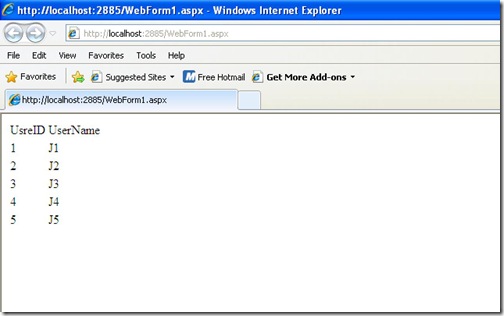
JSON string output in browser

That’s it. This was very basic example but you can crate your own JavaScript enabled grid from this and you can see possibilities are unlimited here. Stay tuned for more.. Happy programming..
Shout it
Share:

Distinct operator in Linq

Linq operator provides great flexibility and easy way of coding. Let’s again take one more example of distinct operator. As name suggest it will find the distinct elements from IEnumerable. Let’s take an example of array in console application and then we will again print array to see is it working or not. Below is the code for that. In this application I have integer array which contains duplicate elements and then I will apply distinct operator to this and then I will print again result of distinct operators to actually see whether its working or not.

using System;
using System.Collections.Generic;
using System.Linq;
using System.Text;

namespace Experiment
{
class Program
{
static void Main(string[] args)
{
int[] intArray = { 1, 2, 2, 3, 3, 3, 4, 4, 4, 4, 5, 5, 5, 5, 5 };
var uniqueIntegers = intArray.Distinct();
foreach (var uInteger in uniqueIntegers)
{
Console.WriteLine(uInteger);
}
Console.ReadKey();

}
}
}
Below is output as expected..
DisntictResult

That’s cool..Stay tuned for more.. Happy programming.
Technorati Tags: ,
Shout it
Share:
Saturday, January 8, 2011

ASP.NET 4.0- Html Encoded Expressions

We all know <%=expression%> features in asp.net. We can print any string on page from there. Mostly we are using them in asp.net mvc. Now we have one new features with asp.net 4.0 that we have HTML Encoded Expressions and this prevent Cross scripting attack as we are html encoding them.

ASP.NET 4.0 introduces a new expression syntax <%: expression %> which automatically convert string into html encoded. Let’s take an example for that.

I have just created an hello word protected method which will return a simple string which contains characters that needed to be HTML Encoded. Below is code for that.

protected static string HelloWorld()
{
return "Hello World!!! returns from function()!!!>>>>>>>>>>>>>>>>>";
}
Now let’s use the that hello world in our page html like below. I am going to use both expression to give you exact difference.
<form id="form1" runat="server">
<div>
<strong><%: HelloWorld()%></strong>
</div>
<div>
<strong><%= HelloWorld()%></strong>
</div>
</form>

Now let’s run the application and you can see in browser both look similar.

HtmlEncodedExpression

But when look into page source html in browser like below you can clearly see one is HTML Encoded and another one is not.

HtmlEncodeView with html encoding

That’s it.. It’s cool.. Stay tuned for more.. Happy Programming
Technorati Tags: ,,
Shout it
Share:
Sunday, January 2, 2011

.NET Framework 4.0-Guid.Parse Method

In earlier version of .NET framework we don’t have Guid.Parse method Now we have an Guid.Parse method in .NET Framework and it’s work like any parse method. Let’s see it by an example. Let’s create console application for that.

class Program
{
static void Main(string[] args)
{
string newID = "f718943d-757d-4975-947b-3dbff1205be6";
Guid myGuId = Guid.Parse(newID);
Console.WriteLine(myGuId.ToString());
Console.ReadLine();


}
}
and as expected here is the out put for that.

Guid

That’s is it’s cool. Stay tuned for more..Happy programming..
Technorati Tags: ,
Shout it
Share:

Support this blog-Buy me a coffee

Buy me a coffeeBuy me a coffee
Search This Blog
Subscribe to my blog


My Mvp Profile
Follow us on facebook
Blog Archive
Total Pageviews
