Recently, During Global Azure Boot camp presentation , One offline question was asked that how we can see and browse the data from DocumentDB. So I thought there will be lots of developers who might have the same question that where I can see data from DocumentDB in visual studio.
Yes you can see your DocumentDB data into visual studio. There is an extension called Cloud explorer from where you can browse all the services of Azure. With Visual Studio community edition its comes inbuilt But If you have not that installed then you can install via following steps.
Once you click on that it open a window loading all the extensions select online and type cloud in the search box and you will able to see cloud explorer like below.
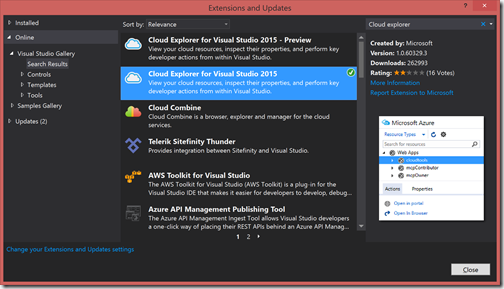
I have Cloud explorer installed in my Visual studio that’s its showing Green tick otherwise it will show download button there and you can download and install it.
You can also download manually from the following link.
For Visual Studio 2015:
https://visualstudiogallery.msdn.microsoft.com/84e83a7c-9606-4f9f-83dd-0f6182f13add
For Visual Studio 2013:
https://visualstudiogallery.msdn.microsoft.com/d3896fc2-109b-4420-9c38-b6ab1cfa9fe5
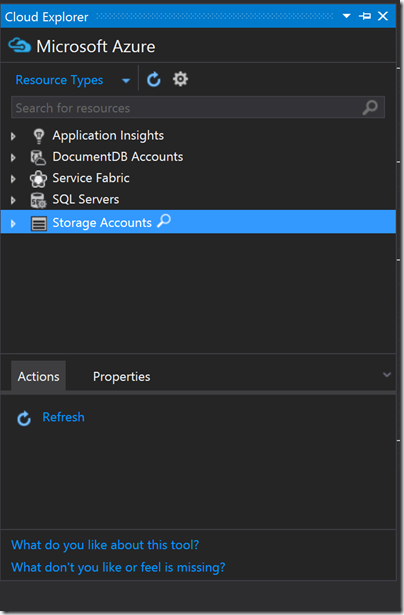
Here I have already given my Azure Credentials If you have not given that it will ask for credentials and then will load this screen.
Here it will show the list of all services available for storage. To see what is there in our DocumentDB account click on DocumentDB Account. It will show your account name lie below.
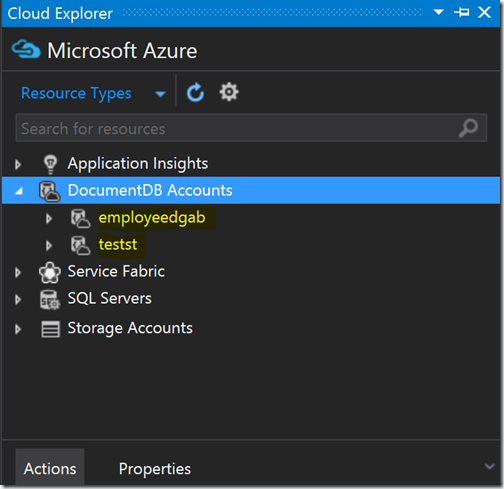
One you click on the database name it will show all the collection and record below.
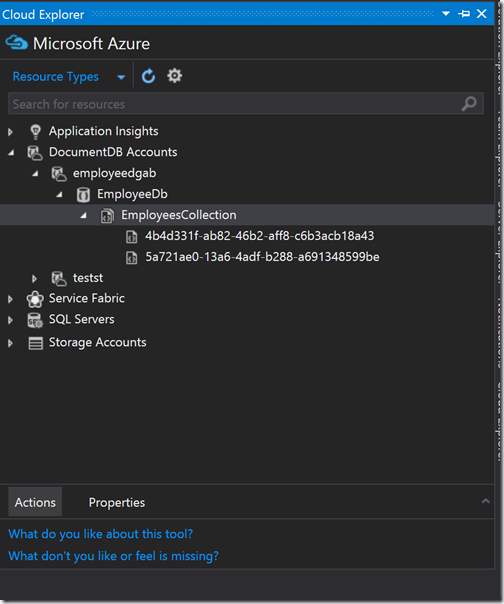
One you select records(JSON documents) and right click. It asks for you to open in the editor like below.
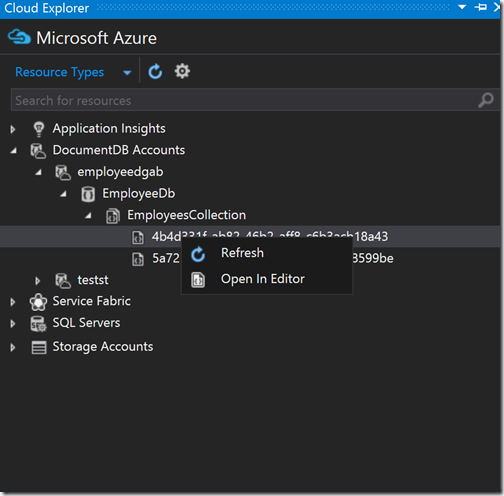
Once you click on open editor, It will ask open that JSON document like below.
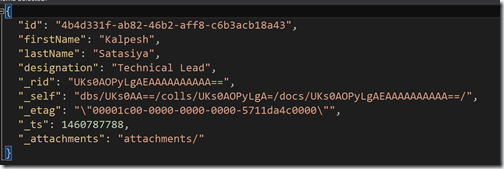
So you can see that it's very easy to browse data of DocumentDB in cloud explorer in Visual Studio itself. Hope you like it. Stay tuned for more!.
Yes you can see your DocumentDB data into visual studio. There is an extension called Cloud explorer from where you can browse all the services of Azure. With Visual Studio community edition its comes inbuilt But If you have not that installed then you can install via following steps.
How to install Cloud explorer in Visual Studio:
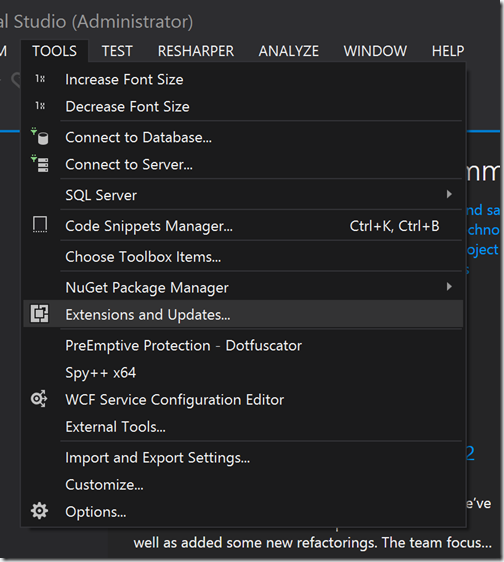
Open visual studio and go to Extensions and updates like below.
Once you click on that it open a window loading all the extensions select online and type cloud in the search box and you will able to see cloud explorer like below.

I have Cloud explorer installed in my Visual studio that’s its showing Green tick otherwise it will show download button there and you can download and install it.
You can also download manually from the following link.
For Visual Studio 2015:
https://visualstudiogallery.msdn.microsoft.com/84e83a7c-9606-4f9f-83dd-0f6182f13add
For Visual Studio 2013:
https://visualstudiogallery.msdn.microsoft.com/d3896fc2-109b-4420-9c38-b6ab1cfa9fe5
How to use Cloud explorer to see data of DocumentDB:
One you are done with installing Cloud explorer, You can load that from View Menu-> Cloud explorer in Visual Studio. It will load like below.
Here I have already given my Azure Credentials If you have not given that it will ask for credentials and then will load this screen.
Here it will show the list of all services available for storage. To see what is there in our DocumentDB account click on DocumentDB Account. It will show your account name lie below.

One you click on the database name it will show all the collection and record below.

One you select records(JSON documents) and right click. It asks for you to open in the editor like below.

Once you click on open editor, It will ask open that JSON document like below.

So you can see that it's very easy to browse data of DocumentDB in cloud explorer in Visual Studio itself. Hope you like it. Stay tuned for more!.