Recently Microsoft has release a CTP version of Visual Studio 14 with ASP.NET VNext application. So I thought I will download and try it. But due to bad internet connection it was not downloading properly. Then I cam across following post about Visual Studio 14 CTP Virtual Machine on Azure.
http://blogs.msdn.com/b/visualstudioalm/archive/2014/06/04/visual-studio-14-ctp-now-available-in-the-virtual-machine-azure-gallery.aspx
So I thought it’s a good idea to spin a virtual machine instead of downloading and installing that which would cost me a day. While on Azure I can set that virtual machine in minutes.
So Following are steps for creating a virtual machine in Azure.
1) Login into your Microsoft Azure Account
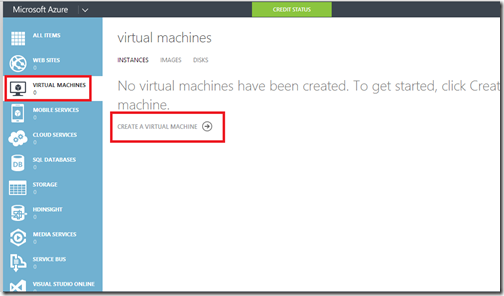
2) From dashboard goto virtual machine and select Create Virtual Machine.
http://blogs.msdn.com/b/visualstudioalm/archive/2014/06/04/visual-studio-14-ctp-now-available-in-the-virtual-machine-azure-gallery.aspx
So I thought it’s a good idea to spin a virtual machine instead of downloading and installing that which would cost me a day. While on Azure I can set that virtual machine in minutes.
So Following are steps for creating a virtual machine in Azure.
How to Create a Virtual Machine on Microsoft Azure with Visual Studio 14 CTP:
2) From dashboard goto virtual machine and select Create Virtual Machine.