Sunday, January 5, 2014

Node.js tools for visual studio

In this post we are going to look how we can use node.js application in visual studio with node.js tools for visual studio.

What is Node.js?


As per wikipedia Node.js is a software plateform that is used to built scalable network(specially server side application). Node.js utilizes JavaScript as its scripting language and achieved high throughput via non blocking I/0 and single-threaded event loop.Node.js was created by Ryan Dhal in starting 2009.Its development and maintenance is sponsored by Joyent.

Why we should care about Node.js:


  1. It uses JavaScript most popular language of the web.
  2. Fast. Powered by incredible V8 virtual machine. It makes JavaScript execution really fast.
  3. A Great feet for real-time web application.
  4. It’s scales very easily.

Node.js tools for visual studio:


You can download the Node.Js tools from the following link.

https://nodejstools.codeplex.com/

Here are some quick features of Node.Js tools.
  1. NTVS support editing, intellisense, profiling, NPM, debugging locally and remotely(Windows, MAC, Linux) as well as Azure web sites and Cloud services.
  2. Designed, Developed and Supported by Microsoft Community.
It is available for both Visual Studio 2012 and Visual Studio 2013 both.

Installation of Node.js tools for visual Studio:


It’s very easy to install download the setup and double click setup.exe it will load following screen.
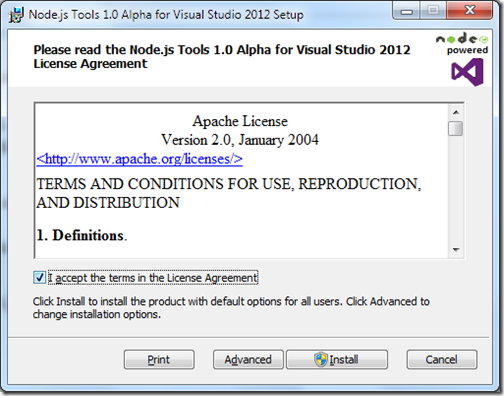
Node-js-visual-studio-tools-installation1

Once you click on install it will load start installing.
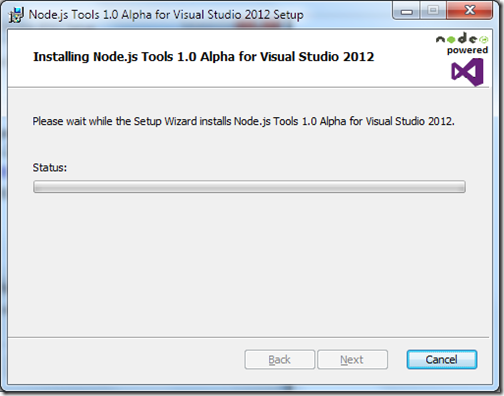
Node-js-visual-studio-tools-installation2

After completing installation it will look like following.
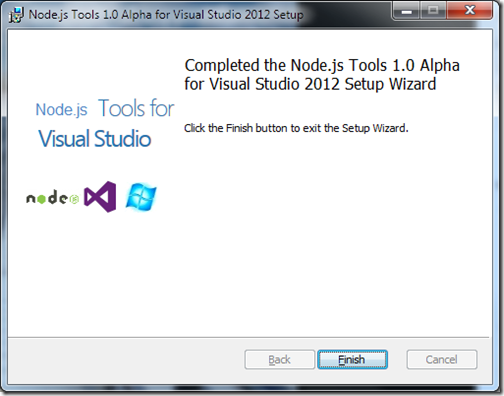
Node-js-visual-studio-tools-installation3

Once you are done with installation open visual studio and go to File-> New Project-> JavaScript and you will see node.js template available.
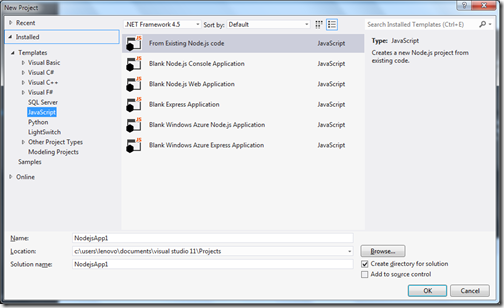
Blank-Node-Js-Application

That’s it. Hope you like it. In next post We are going to create first node.js application with Visual Studio. Stay tuned for more..
Share:
Saturday, January 4, 2014

Year 2014 resolutions

First of all, Happy new year to all of you!!.  May your all your wishes come true this year.This time I am making resolutions public so I am accountable to my readers. Here are resolutions for year 2014.
  1. Should be more active in communities. Since last 3 months I was busy with professional commitments and lot of things happening with life. Now all things are going to be settle down in January month of this year so now I will be more active on communities.
  2. Loose weight. I have already started loosing weight via controlling my diet and this year I am planning to loose at least 15 kgs.
  3. Write three blog post at least a week.
  4. Learn my self new technologies like Node.js and Python.
This four resolution I want to try to achieve lets see how it goes. I will update how I am doing with my resolution each quarter.

Once again happy new year 2014 to all of you!!. Stay tuned for more..
Share:
Sunday, December 29, 2013

Book Review: Microsoft Office 2013 Professional 2013 Step by Step

Before some time Microsoft Press and Oreilly sent me Microsoft Office Professional 2013 Step by step by to review. I was so busy at my professional commandment that I was not able to review. Now I get a time to review and here is review of book.

About this book:


MicrosoftBook
Anybody who knows computer Knows about Microsoft Office Suite there are tons of features available in this office suite like Microsoft Word, Microsoft Excel, Microsoft Power point etc.  We all know this software's a little bit but we were not aware tons of feature each software has and this book aim to reveal all this features this can make your life very easy.

This book is designed for beginning to intermediate users. This books contains all the examples that could benefit individual as well as Business organizations.

This book is divided in 8 Parts from getting started to advance features.

Part-1 Office Professional 2013 Fundamentals:


In this part its get started with making user comfortable with Microsoft Office 2013 Environment and then it also highlights some of shared office features. It also highlights how you can use cloud services with your office application and even how you can use office with windows 8 touch device.

Part-2 Word 2013:


This part contains 6 chapters related to word where it get started with getting comfortable in word 2013 and then it also tells about navigation and reading features of word to editing and composing documents. There are some special chapters for presenting information and finalizing documents also.

Part-3 PowerPoint 2013:


This part contains 6 chapters related Powerpoint from getting comfortable in PowerPoint 2013 to finalizing and presenting. If you are a computer geek and you need to present in front of audience this part is for you. You can become expert in Power point via reading this chapters. It also emphasis creating office graphics and adding animation and multimedia.

Part-4 Excel 2013:


If you are an business owner and uses Excel in your day to day activities then this part is for you. This part contains 7 chapters dedicated to excel. Here you learn everything from creating and editing worksheets to analysing data to creating chart and graphics based on your worksheet. 

Part-5 Outlook 2013:


Emails become one of the best communication channel between people this days and If you don’t know Microsoft Outlook email client then you will look like illiterate. This part is for Outlook 2013. Its start with making yourself comfortable with Outlook 2013  to sending emails. It also contains chapters related to Staying on schedule, Working with tasks, Managing contacts and people and last and important tips and tricks about Microsoft Outlook to save your time. Another excellent part!!

Part-6 One Note 2013:


This part contains 6 chapters related to One Note. If you are attending lots of meeting and you need to take notes then this part is for you. There are tons of features explained about One Note to using One note every where.

Part-7 Access 2013:


This part contains 7 chapters related to Access 2013. From creating table to designing forms and reports to querying tables. If you are running a small organization with Microsoft Access you can maintain your data very easily and this part will make you expert of Microsoft Access.

Part-8 Publisher 2013:


This part contains 3 chapters related to Publisher 2013 from making yourself comfortable to creating,saving and exporting publications.

Conclusion:


Microsoft Office Professional 2013 step by step is a great book for the beginners and for intermediate users it can work as reference book. It explains all the components of Office Professional 2013 in very detail, straight forward and easy to understandable way.  This book is very well written by experience authors like Beth Melton, Mark Dodge, Echo Swinford, Andrew Couch, Eric Legault, Ben M. Schorr and Ciprian Adrian Rusen.

If you want to learn in Office 2013 Professional and become expert then this book is must buy for you!! I highly recommend this book for no voice to intermediate users of Office.

On this occasion, I would also like to thank Microsoft Press and Oreilly team for choosing me to review this book. I learn a lot of things in office with the help of this book.
Share:

Support this blog-Buy me a coffee

Buy me a coffeeBuy me a coffee
Search This Blog
Subscribe to my blog


My Mvp Profile
Follow us on facebook
Blog Archive
Total Pageviews