Tuesday, March 23, 2010

IIS Error: The process cannot access the file because it is being used by another process.

Recently in our one of the web servers all the sites using port 80 were stopped and when we tried to restart website it was giving error like process cannot access the file because it is being used by another process. After analyzing and diagnosis and searching on internet for the same problem i have found that it was a problem due to port 80 was used by another process. To solve the problem i have following command which will list IPs,PID(Process ID) and port that used by the process. The command is as below.

NETSTAT -ano
After running that command in command in command prompt it will give output like following.

IIS Error, IIS 6.0, IIS 7.0

From that output you can fine which port is used by which PID(Process Id). And then you can find the process from task manager. Process Id column in task manager is not enabled by default so you can do by View Menu->Select Column a following dialog box will appear.

ProcessId

Select PID (Process Identifier) and press OK.Now process Id will appear in task manager and in task manger go to processes tab where you can find out process by checking process id column then select that process right click->click End Process that will kill that process. Now again try to restart the IIS Site it will restart. In my case it was java updater who is using same port 80 and after killing my IIS Sites were ok. Hope this will help you..

Technorati Tags: ,

Shout it
kick it on DotNetKicks.com
Share:
Monday, March 22, 2010

C# 4.0-string.IsNullOrWhiteSpace()

We already have string.IsNullOrEmpty() method to check whether the string is null or empty.Now with Microsoft.NET Framework 4.0 there is a new another method that is called string.IsNullOrWhiteSpace() which will also check whether string is having whitespaces or not with null and empty string.This method is help full where we can check string is having whitespace rather then its empty or null. It will return a true if a string is empty,null or its having whitespaces. Let’s create a simple example and will see how its works. Here we are going test it with 4 options Empty string,Normal String,White spaces and Null String. Following is a code for that.

class Program
{
static void Main(string[] args)
{
string TestString = string.Empty;
Console.WriteLine("Test with empty string:{0}",
string.IsNullOrWhiteSpace(TestString));
TestString = "Normal String";
Console.WriteLine("Test with normal string:{0}",
string.IsNullOrWhiteSpace(TestString));
TestString = " ";
Console.WriteLine("Test with whitespace:{0}",
string.IsNullOrWhiteSpace(TestString));
TestString = null;
Console.WriteLine("Test with null:{0}",
string.IsNullOrWhiteSpace(TestString));
Console.ReadLine();
}
}
Following is a output of the above code here you can see its returning false with Normal string and for all other options its returning true as expected.
image

Shout it
kick it on DotNetKicks.com
Share:
Sunday, March 21, 2010

C#-Constructors,Static Constructors and Destructors Execution in Inheritance

While taking interview for .NET Technologies i often ask about the execution sequence of the constructor and destructor in inheritance But from the my experience i have found that lots of people are still confused with execution sequence of constructor and destructors. Lets create a simple example and learn some basic things that is very important while using inheritance in C#.

  • Constructors will be executed in from parent to child sequence means first parent class constructor will be executed then after that child class constructor will be executed.
  • Destructors execution order is reverse then constructors first it will execute child class destructor and then it will execute the parent class destructor.
  • Static constructors are different then the normal constructors and its executes when first object of class is created it will be executed. Most of people are very confused this kind of scenario in inheritance. Here scenario will be like when the first object of child class created then it will execute the child class static constructor and then after the parent class static constructor is executed. After that it will never got executed.

Lets create a simple class which will illustrate the above worlds. First lets create a class A with constructor,destructor and a static constructor.

public class A
{
static A()
{
System.Console.WriteLine("A Static Constructor");
}
public A()
{
System.Console.WriteLine("A public constructor");
}

~A()
{
System.Console.WriteLine("A Destructor");
}
}
Now we will inherit this class with the another class B which is also having constructor,destructor and a static constructor.
public class B : A
{
static B()
{
System.Console.WriteLine("B Static Constructor");
}
public B()
{
System.Console.WriteLine("B public constructor");
}

~B()
{
System.Console.WriteLine("B Destructor");
}
}
Now lets create two objects of Class B in main function of our console application to see how constructors works and after that we will destroy the object via assigning null values and then forcefully we will do Garbage Collection via GC.Collect() to see how destructors works below is the code for that.
 class Program
{
static void Main(string[] args)
{
B b1 = new B();
B b2 = new B();
//code return to destroy object of a class
b1=b2 = null;
GC.Collect();
Console.ReadLine();

}
}
After running the console application output will be as follows.

Construcotr-Destructor in Ineritance,C#

As you can see static constructors are only executed when the first object of a class is created and Constructors are executed like parent to child way and in reverse destructors are executed from child to parent way. Hope this will help you understand execution sequence of constructor in inheritance.

Shout it
kick it on DotNetKicks.com
Share:

Singleton Class in C#

Singleton pattern is very popular pattern used by programmer. The idea behind the singleton pattern is to have only one instance of a class at any time. This kind of pattern is very useful for for heavy resources like Linq Data Context etc. It is also useful in multithreaded application where different thread of application try to crate instance of one class but it should be thread safe. It can be also useful for global resources and state objects. In singleton class there are two things required. One static variable which hold the instance of class and other is a static method which will return the instance of singleton class. Here is the example of singleton class

 public class MySingleTon
{
private static MySingleTon mySingleTonInstance = new MySingleTon();

private MySingleTon()
{
//private constructor
}
public static MySingleTon GetInstace()
{
return mySingleTonInstance;
}

}
Now we are done with calling single ton class like following.
 MySingleTon objSingleTon = MySingleTon.GetInstace(); 
The above example is not thread safe so it may be possible that different thread can create different instance of classes. To make above singleton class thread safe we need to change code like following.
   public class MySingleTon
{
private static MySingleTon mySingleTonInstance = new MySingleTon();

private MySingleTon()
{
//private constructor
}
public static MySingleTon GetInstace()
{
lock (typeof(MySingleTon))
{
if (mySingleTonInstance == null)
{
mySingleTonInstance = new MySingleTon();
}
return mySingleTonInstance;
}

}
}
Hope this will help you…

Shout it
kick it on DotNetKicks.com
Share:
Saturday, March 20, 2010

Visual Studio 2010-Automatically Adjust Visual Experience.

Visual studio 2010 is great IDE and i am discovering everyday some thing new. Today i have discovered one of fantastic option to increase performance of your visual studio IDE. Visual Studio 2010 has option when we enabled it it will automatically adjust the visual and client experience as per your hardware configuration. It will increase the performance of visual studio and productivity in lower hardware also. You can find that checkbox under Tools->General-> Automatically adjust visual experience based on client performance. There are two checkbox is given one for above and another for Rich User Experience but they may decrease your visual studio performance. Like following.

Visual Studio 2010, User Experience

Shout it
kick it on DotNetKicks.com
Share:

Indexer class in C#

While taking interviews for Microsoft.NET i often ask about indexer classes in C#.NET and i found that most of people are unable to give answer that how we can create a indexer class in C#.NET. We know the array in C#.NET and each element in array can be accessed by index same way for indexer class a object was class can be accessed by index. Its very easy to create a indexer class in C#. First lets looks some points related to indexer class in C#.

  • Indexer class object can be accessed by index only.
  • We can use same mechanism to access object of indexer class as we are doing it for array.
  • You can can specify any valid C# type as return type of indexer classes.
  • You must have to create a property with parameter using this keyword for indexer class.
  • You can also implement multi parameter indexer also.

Let’s create simple indexer class with single parameter and for string type.

 public class MyIndexer
{
private string[] MyIndexerData;
private int SizeOfIndexer;

//declaring cursor to assing size of indexer
public MyIndexer(int sizeOfIndex)
{
this.SizeOfIndexer = sizeOfIndex;
MyIndexerData = new string[SizeOfIndexer];
}

public string this[int Position]
{
get
{
return MyIndexerData[Position];
}
set
{
MyIndexerData[Position] = value;
}
}
}
Now we done with indexer class and lets create object of that indexer class and will see output of our console application also. Following is the code for that.
namespace ConsoleApplication1
{
class Program
{
static void Main(string[] args)
{
int indexSize=5;
MyIndexer objMyIndexer = new MyIndexer(indexSize);
for (int i = 0; i < indexSize; i++)
{
objMyIndexer[i] = i.ToString();
Console.WriteLine("Indexer Object Value-[{0}]: {1}",
i, objMyIndexer[i]);
}
Console.ReadKey();
}
}
}
and Here is the output for the indexer class console application.

Indexer Class Example in C#,Indexer Class,C#

Technorati Tags: ,,
Shout it
kick it on DotNetKicks.com
Share:

Microsoft.NET 4.0/VB.NET 10 Automatic Properties

In C# we are having automatic properties since C# 3.5 framework but now with Microsoft.NET 4.0 Framework VB.NET 10.0 version we are also having automatic properties for VB.NET Also.

Like in C# we can define automatic like following.

Public string TestProperty
{
get;
set;
}
Same way we can define in automatic Property in VB.NET as follows.
Public Property TestProperty As String 
You can use this properties any where in class same as C# automatic property.

Shout it
kick it on DotNetKicks.com
Share:

ASP.NET and Load balancing.

In one of our project the site usage of site was very heavy and we need to migrate it to load balancing server. I have never configured the sites in the load balancing server but it was quite interspersing experience Here are the some points which we need to take care while we move asp.net sites into the load balancing environments. So first we will see what is load balancing.

Following is a load balancing definition from the Google.

In computer networking, load balancing is a technique to distribute workload evenly across two or more computers, network links, CPUs, hard drives, or other resources, in order to get optimal resource utilization, maximize throughput, minimize response time, and avoid overload.

Following are the points which you need to take care when you are deploying your asp.net sites into load balancing server environments.

Machine Key Should be same for both servers: View state and session both are depends on the machine key. If you machine key is not same then you will have problems related to session and view state you may loose your session and view state in between request during post backs. If machine key will not be same then its possible that you can get strange result in Ajax requests. There is a machine key section in web.config where you can specify machine key.

<machineKey validationKey='C44B8B7C521CB5BC7E602BAE6118AA44CD690C7304817129DA27C17E800132A1BD946C6D9AD12F0A5B342840C7D130564195428160B7466146938CA9E3A62686'   decryptionKey='0E9DF2DA7F210B84087690FF0BF25C905182AD81E16A5FA9'   validation='SHA1'/>
Session Configuration: Any web application is not possible without having session as web pages are stateless so you can configure session in load balancing also. There are two configuration which can be used in load balancing environments. One is state service and another is Storing session in SQL Server.

Following is a good link to learn how you can configure sessions state in asp.net application.

http://www.microsoft.com/technet/prodtechnol/WindowsServer2003/Library/IIS/0d9dc063-dc1a-46be-8e84-f05dbb402221.mspx?mfr=true

And here is a good link to configure session on SQL Server.

http://support.microsoft.com/kb/317604

You can configure session state mode in your web.config like following.

<sessionState mode="SQLServer" StateConnectionString="tcpip=127.0.0.1:42424"

SqlConnectionString = "data source=SERVERNAME; user id=sa; password=sa"

cookieless="false" timeout="20" />

enableViewStateMac="false": This is a alternative approach to machine key. This will tell asp.net engine that whether it should check Machine authentication check or not and if you made it false then it will not check for machine authentication. You can define that in your web.config pages section like following.
<system.web>
<pages enableViewStateMac="false" />
</system.web>
Caspol Utility: You can use caspol utility to share some resources on between load balancing servers. Like we have file base cache dependency in our application so we have created a central location(A shared folder for cache files) for the both the server and used Caspol utility to give full trust share on that folder for load balancing servers. Following are some of the good links to which will teach how you can use CasPol utility to for asp.net application

http://blogs.msdn.com/shawnfa/archive/2004/12/30/344554.aspx

http://forums.asp.net/p/1119925/1881331.aspx#1881331

http://www.eggheadcafe.com/software/aspnet/30227544/caspol-addfulltrust.aspx

File Replication:File Replication is also an important features of load balancing you should have replication enabled on the folders of web application so if you upload anything on one server it should replicated to other sites. Following is good link to understand file replication.

http://www.tgrmn.com/web/kb/item28.htm

Sticky Sessions:
In some scenario Sticky session is very useful. In one page our application we have used extensive Ajax and we need that for each request and partial post back it should stay on one server till request completes.To achieve that we can used sticky session. Following are some good links to know about sticky sessions.

http://dev.fyicenter.com/Interview-Questions/JavaScript/What_does_the_term_sticky_session_mean_in_a_web_.html

http://blogs.msdn.com/drnick/archive/2007/07/13/sticky-sessions.aspx

Hope this will help you on deploying your asp.net on load balancing sites. Following are some good links for understanding load balancing in more details

http://technet.microsoft.com/en-us/library/bb742455.aspx
http://support.microsoft.com/kb/323437
http://technet.microsoft.com/en-us/library/cc754833%28WS.10%29.aspx.
http://edge.technet.com/Media/Network-Load-Balancing-NLB-in-Windows-Server-2008/

Shout it

kick it on DotNetKicks.com
Share:
Monday, March 15, 2010

Rename feature in Visual Web Developer 2010/Visual Studio 2010

Visual web developer is great tool and I am playing more and more with it and every time I am discovering some new features of it. Recently I have discovered a very cool feature of it. I want to rename a variable in visual studio 2010 Web Developer express edition and I found a great refractor tool for that which will rename that variable in all the instance and all the methods. First you need to select variable which you want to rename and then you need to Right Click ->Refractor->Rename. You can also invoke that via its shortcut Ctrl + R,Ctrl +R and it will be available For reference see the below screenshot.

Rename variable featuers in visual studio 2010

Once you click the rename which will have a dialog box open which will ask for new name or variable like following.

RenameDilaog option in visual web developer 2010

It is also having options for search in comments and search in string. Search in comment will search and replace in comment and search in string will replace word for any string which contains that variable name. Once you put new name in dialog box it will display a preview of replaced strings like following. Here also you can select where you need to rename and where you don’t want to rename and this is really cool. :)

Preview dialog for visual web developer 2010

Shout it
Share:
Friday, February 26, 2010

How to send mail asynchronously in asp.net

With Microsoft.NET Framework 2.0 everything is asynchronous and we can send mail also asynchronously. This features is very useful when you send lots of bulk mails like news letter. You don’t have to wait for response from mail server and you can do other task .

Let's create a simple example to send mail. For sending mail asynchronously you need to create a event handler that will notify that mail successfully sent or some errors occurred during sending mail. Let’s create a mail object and then we will send it asynchronously. You will require System.Net.Mail space to import in your page to send mail.

//you require following name space
using System.Net.Mail;

//creating mail message object
MailMessage mailMessage = new MailMessage();
mailMessage.From = new MailAddress("Put From mail address here");
mailMessage.To.Add(new MailAddress("Put To Email Address here"));
mailMessage.CC.Add(new MailAddress("Put CC Email Address here"));
mailMessage.Bcc.Add(new MailAddress("Put BCC Email Address here"));
mailMessage.Subject = "Put Email Subject here";
mailMessage.Body = "Put Email Body here ";
mailMessage.IsBodyHtml = true;//to send mail in html or not


SmtpClient smtpClient = new SmtpClient("Put smtp server host here", 25);//portno here
smtpClient.EnableSsl = false; //True or False depends on SSL Require or not
smtpClient.UseDefaultCredentials = true ; //true or false depends on you want to default credentials or not
Object mailState = mailMessage;

//this code adds event handler to notify that mail is sent or not
smtpClient.SendCompleted += new SendCompletedEventHandler(smtpClient_SendCompleted);
try
{
smtpClient.SendAsync(mailMessage, mailState);
}
catch (Exception ex)
{
Response.Write(ex.Message);
Response.Write(ex.StackTrace);
}
Following is a code for event handler

void smtpClient_SendCompleted(object sender, System.ComponentModel.AsyncCompletedEventArgs e)
{
MailMessage mailMessage = e.UserState as MailMessage;
if (!e.Cancelled && e.Error != null)
{
Response.Write("Email sent successfully");
}
else
{
Response.Write(e.Error.Message);
Response.Write(e.Error.StackTrace);
}
}
So that’s it you can send mail asynchronously this 30-40 lines of code.

Technorati Tags: ,

Shout it

kick it on DotNetKicks.com
Share:
Sunday, February 21, 2010

How to import your tweets into Google Buzz.

Social networking is a important feature for any person for professionally ass well as personally. You can stay in touch with your friends,colleague and other peoples thanks to social networking sites. Google Buzz is a counter part of twitter from Google. you can post anything on that and you don’t have limit of 140 characters just like. But now there are lots of social networking site available  like Face book,Twitter,Orkut,LinkedIn and now Google Buzz and updating your profile and other things on every social networking site is a tedious job.So, I decided to synchronize my twitter account into Google Buzz. Adding your twitter account in Google Buzz is very easy. First open your Gmail Account and then click on Buzz it will redirect you to your Google Buzz screen. Then click on connected sites and following skin will appear.

Twitter

Click on add it will ask your twitter name just put your twitter name and that’s it you have done with it. Your tweet will appear in Google Buzz depends on traffic from 1 min to 1 hour.

kick it on DotNetKicks.com
Shout it
Share:

Delete all cookies and session in asp.net

Cookies are one of most important features of web application. From where we store little information on client side in one of my project we need to delete all cookies and as you can not delete cookies from server side so we have to expire them manually. Here is the code for that.

 string[] myCookies = Request.Cookies.AllKeys;
foreach (string cookie in myCookies)
{
Response.Cookies[cookie].Expires = DateTime.Now.AddDays(-1);
}
Same way we can delete all session for following code.
Session.Abandon();
Technorati Tags: ,,,

Shout it
kick it on DotNetKicks.com
Share:
Saturday, February 20, 2010

How to remove all the cache object from asp.net application

Cache object in .NET technologies very power full feature and we all use it for increasing out application performance. In one of my project i need to remove all of the my cache once some task was completed. So i have done some digging and i have found some beautiful way of removing all the cache object. As you know cache it self is dictionary entry object so we can always remove them via loop here are some of code examples from which we can remove the all the cache object.

//Following namespace you need.
using System.Collections;
using System;
using System.Collections.Generic;
using System.Web;

IDictionaryEnumerator cacheEnumerator = HttpContext.Current.Cache.GetEnumerator();

while (cacheEnumerator.MoveNext())
{
HttpContext.Current.Cache.Remove(cacheEnumerator.Key.ToString());
}
Here is the another example of removing cache.
foreach (DictionaryEntry dEntry in HttpContext.Current.Cache)
{
HttpContext.Current.Cache.Remove(dEntry.Key.ToString());
}
Please make sure this is way only for the cache object it will not going to remove other cache like output cache etc.


kick it on DotNetKicks.com
Shout it
Share:
Thursday, February 4, 2010

Microsoft Community Techdays at Ahmedabad- A great Event

On 30th January Microsoft,Pass Organization and Ahemdabad .NET User Group organized Microsoft Community Techdays. It was a great event and full of information. There were five session with the full of content. First session was given by Mahesh Dhola on the Windows Azure Platform. In his session he explained all the thing related with windows azure platform from basics like what is windows azure why it is required and what is use of windows azure platform and how its works.

Windows Azure presentation by Mahesh Dhola

Insight of Windows Azure Platform by Mahesh Dhola

The next session was presented by Pinal Dave- A Microsoft Most Valuable Professional and Well know Database Architect for SQL Server. It was about SQL Azure. He has explained what is SQL Azure and all the tools that are needed to connect and maintain database on SQL Azure Server.

PICT0015

SQL Azure: Extending SQL Data Platform to Cloud By Pinal Dave

Then after lunch there was session given by Jadeja Dushyantsinh on Silvelight 4.0. In this session he has explained what is Silvelight, History of Silvelight and what’s new in Silvelight 4.0.The session also include some interesting demo of Silvelight 4.0 Features.

PICT0029

Microsoft Silvelight 4.0- An Overview By Dushyantsinh Jadeja

After this session there was an interesting session by Jacob Sebastian A well know SQL Book writer and Microsoft Most Valuable Professional . He explained SQL Server 2008 R2 data migration features and integration with Visual Studio 2010 by taking an example of love story of Summit- A DBA and Leena-A Developer. It was a great session We have learnt lots of refracting features available in SQL Server 2008 R2 and Visual Studio 2010 Ultimate.

PICT0038

Fall in love with SQL Server 2008 R2 By Jacob Sebastian

Last but not least session given by Prabhjot Bakshi – A well known Microsoft Certified Trainer about Visual Studio 2010 enhancement for Developers. In this session he has explained UML Designer features and lots of new things about Microsoft.NET 4.0 and Microsoft Visual Studio 2010. He has also explained why we need functional programming and some features of F#- A new functional programming language by Microsoft. Indeed it was great i have learnt lot about that in this session.

PICT0049

Visual Studio 2010 enhancement for Developers By Prabhjot Bakshi

PICT0054

Me(First from Left) with Mahesh Dhola,Prabhjot Bakshi and other Ahmedabad Group Members

Overall it was a great event and thank you once again Microsoft for organizing such events.

Shout it
Share:
Tuesday, January 5, 2010

Creating Hello World application with Silverlight 3.0 with Visual Studio 2010

Silvelight is latest buzz in Microsoft.NET Technologies. Silverlight enable us to create rich user interface for the web based application. Let create a simple application to understand how Silverlight application works.

We will start creating application with file menu –> New Project –>Silverlight application a dialog for silverlight application will open like following.
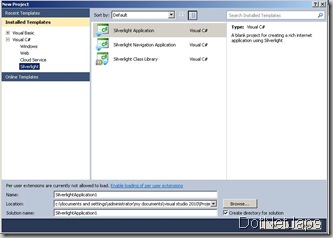
Hello Word application by silver light 3.0

Once you create a Silverlight application a new dialog will open to create a website which will host Silvelight application like following.

SilverLight

This website are used for hosting Silvelight application. Please note that Silverlight application can also run with simple html file also. After clicking on Ok it will create a simple project like following in solution explorer.

Solution Explorer,Silver Light 3.0,ASP.NET 4.0

Now let's Create a simple button and on clicking on that button will print “Hello World” on screen.With Silvelight used Microsoft new UI Language called XAML which used to define the object in the SilverLight.

Once we create a silvelight application which will create a MainPage.xaml and MainPage.xaml.cs file for the same. It will create by default XAML like following.

<UserControl x:Class="MySilverLight.MainPage"
xmlns="http://schemas.microsoft.com/winfx/2006/xaml/presentation"
xmlns:x="http://schemas.microsoft.com/winfx/2006/xaml"
xmlns:d="http://schemas.microsoft.com/expression/blend/2008"
xmlns:mc="http://schemas.openxmlformats.org/markup-compatibility/2006"
mc:Ignorable="d"
d:DesignHeight="300" d:DesignWidth="400">

<Grid x:Name="LayoutRoot" Background="White">

</Grid>
</UserControl>
Here grid will be act as container like as we are using content pane in our asp.net application. Which can host the another objects like button text and other objects. Now I am creating a simple hello world button via adding following xml between <Grid> and </Grid> tag.
<Button x:Name="HelloWorldButton" Content="Push to print Hello World on Screen " Height="25" Width="250"></Button> 

Here x:name is name of button and content is text that will display on button,width will specify width of button and height will specify height of button. It will create a simple button like following in the design layout of silverlight application as following.

SilverLight 3.0,

Now let add a text block object which will print the Hello world text on the screen after clicking button with following XAML.
<TextBlock x:Name="Mytextbox" Text="Print Text" Height="25" Margin="75,197,92,78"></TextBlock>
Which will create a text block just below the button like following. Here margin will define the margin from four side just like html. Text block will behave just like label in asp.net application

TextBlock, SilverLight Button, Silverlight 3.0

After that Let’s add a add a click event to button via modifying existing XAML like following .
<Button x:Name="HelloWorldButton" Content="Push to print Hello World on Screen " Height="25px" Width="250px" Click="HelloWorldButton_Click" ></Button> 
It will create a click handler for the button we have added after then we can add code to print Hello World!! to event handler we have just create like following.
private void HelloWorldButton_Click(object sender, RoutedEventArgs e)
{
Mytextbox.Text = "Hello World!!!";
}
Now compile and run the application it will open a browser and once you click the button it will print a hello world!! text like following.

Silverlight in Browser,SilverLigh Helloworld


Technorati Tags: ,
Shout it
kick it on DotNetKicks.com
Share:
Saturday, January 2, 2010

The operation could not be completed. Class not registered- Visual Studio 2010 Express edition beta2.

My operating system was crashed so i have again downloaded and installed Microsoft Visual Studio 2010 Express edition beat 2. But when i was trying to create a web application then i got the error message that “The operation could not be completed. Class not registered.” Other projects were working fine and I am able to create asp.net website. After doing searching for sometime the i found following link.

https://connect.microsoft.com/VisualStudio/feedback/ViewFeedback.aspx?FeedbackID=498787&wa=wsignin1.0

From that i found that it was Microsoft SQL Server Express edition that is creating problem. I had installed Microsoft Visual Studio IDE not the SQL Server Express 2008 edition. So i have installed SQL Server Express Edition 2008 and now its working fine. But it is very strange that i can not create a web application project with out installing it.

Technorati Tags: ,
Shout it
Share:

Happy New Year 2010- From the writer of DotNetJaps

Technorati Tags: ,

I wish happy new year 2010 to all my readers.I know that this blog has been quite from last 1 or 2 month but i was busy with professional end as well as my computer operation system was break so it was long process to get my all data back and having reinstalled all the software and other thing i need but i promise you that i will post all the new latest thing asp.net 4.0,Microsoft SQL Server 2008, Silver light and other latest Microsoft Technologies that I am going explore in this new year so you will going hear at least one post week from this blog.

Once again I am wishing you a very happy and phosphorus new year to all of you.

Shout it
Share:

Support this blog-Buy me a coffee

Buy me a coffeeBuy me a coffee
Search This Blog
Subscribe to my blog


My Mvp Profile
Follow us on facebook
Blog Archive
Total Pageviews
