Sunday, February 21, 2010

How to import your tweets into Google Buzz.

Social networking is a important feature for any person for professionally ass well as personally. You can stay in touch with your friends,colleague and other peoples thanks to social networking sites. Google Buzz is a counter part of twitter from Google. you can post anything on that and you don’t have limit of 140 characters just like. But now there are lots of social networking site available  like Face book,Twitter,Orkut,LinkedIn and now Google Buzz and updating your profile and other things on every social networking site is a tedious job.So, I decided to synchronize my twitter account into Google Buzz. Adding your twitter account in Google Buzz is very easy. First open your Gmail Account and then click on Buzz it will redirect you to your Google Buzz screen. Then click on connected sites and following skin will appear.

Twitter

Click on add it will ask your twitter name just put your twitter name and that’s it you have done with it. Your tweet will appear in Google Buzz depends on traffic from 1 min to 1 hour.

kick it on DotNetKicks.com
Shout it
Share:

Delete all cookies and session in asp.net

Cookies are one of most important features of web application. From where we store little information on client side in one of my project we need to delete all cookies and as you can not delete cookies from server side so we have to expire them manually. Here is the code for that.

 string[] myCookies = Request.Cookies.AllKeys;
foreach (string cookie in myCookies)
{
Response.Cookies[cookie].Expires = DateTime.Now.AddDays(-1);
}
Same way we can delete all session for following code.
Session.Abandon();
Technorati Tags: ,,,

Shout it
kick it on DotNetKicks.com
Share:
Saturday, February 20, 2010

How to remove all the cache object from asp.net application

Cache object in .NET technologies very power full feature and we all use it for increasing out application performance. In one of my project i need to remove all of the my cache once some task was completed. So i have done some digging and i have found some beautiful way of removing all the cache object. As you know cache it self is dictionary entry object so we can always remove them via loop here are some of code examples from which we can remove the all the cache object.

//Following namespace you need.
using System.Collections;
using System;
using System.Collections.Generic;
using System.Web;

IDictionaryEnumerator cacheEnumerator = HttpContext.Current.Cache.GetEnumerator();

while (cacheEnumerator.MoveNext())
{
HttpContext.Current.Cache.Remove(cacheEnumerator.Key.ToString());
}
Here is the another example of removing cache.
foreach (DictionaryEntry dEntry in HttpContext.Current.Cache)
{
HttpContext.Current.Cache.Remove(dEntry.Key.ToString());
}
Please make sure this is way only for the cache object it will not going to remove other cache like output cache etc.


kick it on DotNetKicks.com
Shout it
Share:
Thursday, February 4, 2010

Microsoft Community Techdays at Ahmedabad- A great Event

On 30th January Microsoft,Pass Organization and Ahemdabad .NET User Group organized Microsoft Community Techdays. It was a great event and full of information. There were five session with the full of content. First session was given by Mahesh Dhola on the Windows Azure Platform. In his session he explained all the thing related with windows azure platform from basics like what is windows azure why it is required and what is use of windows azure platform and how its works.

Windows Azure presentation by Mahesh Dhola

Insight of Windows Azure Platform by Mahesh Dhola

The next session was presented by Pinal Dave- A Microsoft Most Valuable Professional and Well know Database Architect for SQL Server. It was about SQL Azure. He has explained what is SQL Azure and all the tools that are needed to connect and maintain database on SQL Azure Server.

PICT0015

SQL Azure: Extending SQL Data Platform to Cloud By Pinal Dave

Then after lunch there was session given by Jadeja Dushyantsinh on Silvelight 4.0. In this session he has explained what is Silvelight, History of Silvelight and what’s new in Silvelight 4.0.The session also include some interesting demo of Silvelight 4.0 Features.

PICT0029

Microsoft Silvelight 4.0- An Overview By Dushyantsinh Jadeja

After this session there was an interesting session by Jacob Sebastian A well know SQL Book writer and Microsoft Most Valuable Professional . He explained SQL Server 2008 R2 data migration features and integration with Visual Studio 2010 by taking an example of love story of Summit- A DBA and Leena-A Developer. It was a great session We have learnt lots of refracting features available in SQL Server 2008 R2 and Visual Studio 2010 Ultimate.

PICT0038

Fall in love with SQL Server 2008 R2 By Jacob Sebastian

Last but not least session given by Prabhjot Bakshi – A well known Microsoft Certified Trainer about Visual Studio 2010 enhancement for Developers. In this session he has explained UML Designer features and lots of new things about Microsoft.NET 4.0 and Microsoft Visual Studio 2010. He has also explained why we need functional programming and some features of F#- A new functional programming language by Microsoft. Indeed it was great i have learnt lot about that in this session.

PICT0049

Visual Studio 2010 enhancement for Developers By Prabhjot Bakshi

PICT0054

Me(First from Left) with Mahesh Dhola,Prabhjot Bakshi and other Ahmedabad Group Members

Overall it was a great event and thank you once again Microsoft for organizing such events.

Shout it
Share:
Tuesday, January 5, 2010

Creating Hello World application with Silverlight 3.0 with Visual Studio 2010

Silvelight is latest buzz in Microsoft.NET Technologies. Silverlight enable us to create rich user interface for the web based application. Let create a simple application to understand how Silverlight application works.

We will start creating application with file menu –> New Project –>Silverlight application a dialog for silverlight application will open like following.

Hello Word application by silver light 3.0

Once you create a Silverlight application a new dialog will open to create a website which will host Silvelight application like following.

SilverLight

This website are used for hosting Silvelight application. Please note that Silverlight application can also run with simple html file also. After clicking on Ok it will create a simple project like following in solution explorer.

Solution Explorer,Silver Light 3.0,ASP.NET 4.0

Now let's Create a simple button and on clicking on that button will print “Hello World” on screen.With Silvelight used Microsoft new UI Language called XAML which used to define the object in the SilverLight.

Once we create a silvelight application which will create a MainPage.xaml and MainPage.xaml.cs file for the same. It will create by default XAML like following.

<UserControl x:Class="MySilverLight.MainPage"
xmlns="http://schemas.microsoft.com/winfx/2006/xaml/presentation"
xmlns:x="http://schemas.microsoft.com/winfx/2006/xaml"
xmlns:d="http://schemas.microsoft.com/expression/blend/2008"
xmlns:mc="http://schemas.openxmlformats.org/markup-compatibility/2006"
mc:Ignorable="d"
d:DesignHeight="300" d:DesignWidth="400">

<Grid x:Name="LayoutRoot" Background="White">

</Grid>
</UserControl>
Here grid will be act as container like as we are using content pane in our asp.net application. Which can host the another objects like button text and other objects. Now I am creating a simple hello world button via adding following xml between <Grid> and </Grid> tag.
<Button x:Name="HelloWorldButton" Content="Push to print Hello World on Screen " Height="25" Width="250"></Button> 

Here x:name is name of button and content is text that will display on button,width will specify width of button and height will specify height of button. It will create a simple button like following in the design layout of silverlight application as following.

SilverLight 3.0,

Now let add a text block object which will print the Hello world text on the screen after clicking button with following XAML.
<TextBlock x:Name="Mytextbox" Text="Print Text" Height="25" Margin="75,197,92,78"></TextBlock>
Which will create a text block just below the button like following. Here margin will define the margin from four side just like html. Text block will behave just like label in asp.net application

TextBlock, SilverLight Button, Silverlight 3.0

After that Let’s add a add a click event to button via modifying existing XAML like following .
<Button x:Name="HelloWorldButton" Content="Push to print Hello World on Screen " Height="25px" Width="250px" Click="HelloWorldButton_Click" ></Button> 
It will create a click handler for the button we have added after then we can add code to print Hello World!! to event handler we have just create like following.
private void HelloWorldButton_Click(object sender, RoutedEventArgs e)
{
Mytextbox.Text = "Hello World!!!";
}
Now compile and run the application it will open a browser and once you click the button it will print a hello world!! text like following.

Silverlight in Browser,SilverLigh Helloworld


Technorati Tags: ,
Shout it
kick it on DotNetKicks.com
Share:
Saturday, January 2, 2010

The operation could not be completed. Class not registered- Visual Studio 2010 Express edition beta2.

My operating system was crashed so i have again downloaded and installed Microsoft Visual Studio 2010 Express edition beat 2. But when i was trying to create a web application then i got the error message that “The operation could not be completed. Class not registered.” Other projects were working fine and I am able to create asp.net website. After doing searching for sometime the i found following link.

https://connect.microsoft.com/VisualStudio/feedback/ViewFeedback.aspx?FeedbackID=498787&wa=wsignin1.0

From that i found that it was Microsoft SQL Server Express edition that is creating problem. I had installed Microsoft Visual Studio IDE not the SQL Server Express 2008 edition. So i have installed SQL Server Express Edition 2008 and now its working fine. But it is very strange that i can not create a web application project with out installing it.

Technorati Tags: ,
Shout it
Share:

Happy New Year 2010- From the writer of DotNetJaps

Technorati Tags: ,

I wish happy new year 2010 to all my readers.I know that this blog has been quite from last 1 or 2 month but i was busy with professional end as well as my computer operation system was break so it was long process to get my all data back and having reinstalled all the software and other thing i need but i promise you that i will post all the new latest thing asp.net 4.0,Microsoft SQL Server 2008, Silver light and other latest Microsoft Technologies that I am going explore in this new year so you will going hear at least one post week from this blog.

Once again I am wishing you a very happy and phosphorus new year to all of you.

Shout it
Share:
Monday, November 30, 2009

C# 4.0-Dynamic Data Type, Difference between var and dynamic

C# 4.0 introduces a new keyword called 'Dynamic'. It can consume any object anything. Let's see some examples for that.
dynamic intExample = 1;
Response.Write(intExample);

dynamic floatExample = 2.5;
Response.Write(floatExample);

dynamic stringExample = "DotNetJaps";
Response.Write(stringExample);
It will print out put on web page as following.

C#-4.0-Dynamic-Keyword-Diffrence-Between-Var-And-Dynamic-Type

Now, you will have question what's new in that. It could be also done with var keyword . Yes, you can do same thing with var but dynamic keyword is slightly different then var keyword.

Diffrence between var and dynamic keyword:

var keyword will know the value assigned to it at compile time while dynamic keyword will resolve value assigned to it at run time. I know you guys don't believe me without example. So let's take example of string.
string s = "DotNetJaps-A Blog for asp.net,C#.net,VB.NET";
var varstring=s;
Response.Write(varstring.MethodDoesnotExist());
Now try to compile above code it will not compile and it gives a error that 'string' does not contain a definition for 'MethodDoesnotExist' and no extension method 'MethodDoesnotExist' accepting a first argument of type 'string' could be found (are you missing a using directive or an assembly reference?'. So var keyword knows that what value or object or anything assigned to it. Now lets try to compile same code with dynamic example like following.
string s = "DotNetJaps-A Blog for asp.net,C#.net,VB.NET";
dynamic varstring=s;
Response.Write(varstring.MethodDoesnotExist());
This will compile. So it is the difference between dynamic and var keyword. With dynamic keyword anything assigned to it like property,objects operators anything that will be determined at compile time. It can be useful while we are doing programming with com,JavaScript which can have runtime properties.

Happy Programming...

Technorati Tags: ,,,
Shout it

kick it on DotNetKicks.com
Share:
Sunday, November 29, 2009

Simple Insert,Update,View and Delete with LINQ-To-SQL

Today one of my friend asked me about simple insert,update and delete example with LINQ-To-SQL but at that time i was not having any simple example which will show the power of LINQ-To-SQL Example. So i have decided to create one simple example with LINQ-To-SQL and also decide to blog about it. Let's create a simple example which is very simple and also show basic step to use LINQ-To-SQL. First i have created a simple table called which have 4 fields like ProductId,Name,Description and Price. Like following.

Table-for-which-LINQ-To-SQL-Classes-Generated

Here is the description for each fields
  1. ProductId- A id which uniquely identify each product.
  2. Name- Name of Product
  3. Description- A short description about product
  4. Price- Price of Product.
Now, Lets create a Linq-To-SQL and rename it as MyDataContent.dbml as following. For that Go to your project ->Right Click->Add New Item->Go to Data Template-> LINQ to SQL Classes like following.
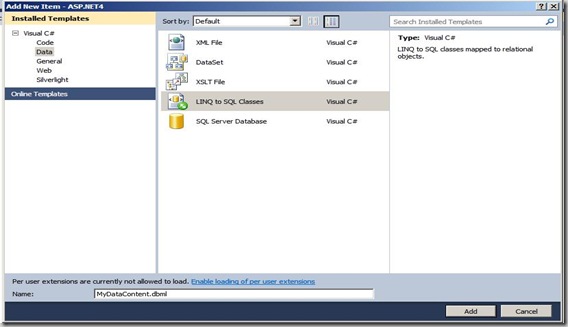
How-to-add-LINQ-To-SQL-Classes-to-your-application

Then open Database Explorer and drag and drop Product table on the newly generated LINQ-to-SQL Class like following.
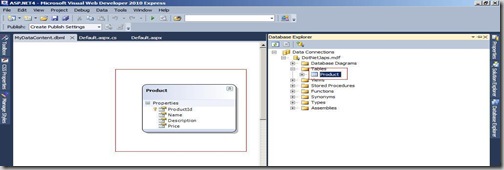
How-Drag-and-Drop-Database-Tables-to-Linq-To-SQL-Classes

Now our LINQ-SQL-Class is Ready. Now we will insert some data to our table and then first we will write code to get all product information from the database. I have created a function called GetProduct which will print all the product information on page with the help of Response.Write . Following is code for that.
public void GetProducts()
{
using (MyDataContentDataContext context = new MyDataContentDataContext())
{
var Products = from product in context.Products
orderby product.Name
select product;
foreach(Product p in Products)
{
Response.Write(string.Format("<B>Id</B>:{0}", p.ProductId.ToString()));
Response.Write(string.Format("<B>Name</B>:{0}", p.Name));
Response.Write(string.Format("<B>Description</B>:{0}", p.Description));
Response.Write(string.Format("<B>Price</B>:{0}", p.Price.ToString()));
Response.Write("===========================================");
}
}
}
Now Let's Create a function to Add Product. Following is code for function to add product.
public void AddProduct(Product product)
{
using (MyDataContentDataContext context = new MyDataContentDataContext())
{
context.Products.InsertOnSubmit(product);
context.SubmitChanges();
}
}
In the above function i am passing a new object of product and passing that object to above function following is a code for that which create a new product via calling above function.
//Add New Product
Product product = new Product();
product.Name = "Product3";
product.Description="This is product 3 Description";
product.Price=10;
AddProduct(product);
Now we have added the code to add product now lets create a function to update the current product information. Following is a code for that.
public void UpdateProduct(int productId, string name, string description, double price)
{
using (MyDataContentDataContext context = new MyDataContentDataContext())
{
Product currentProduct = context.Products.FirstOrDefault(p => p.ProductId == productId);
currentProduct.Name = name;
currentProduct.Description = description;
currentProduct.Price = price;
context.SubmitChanges();
}
}
With the help of above function you can update current product like following.
////Update Product
UpdateProduct(2,"New Product2","New Description for product",20);
Now we added the code for update product so now let's create a sample code to delete a specific product. Following is a code for that.
public void DeleteProduct(int productId)
{
using (MyDataContentDataContext context = new MyDataContentDataContext())
{
Product currentProduct = context.Products.FirstOrDefault(p => p.ProductId == productId);
context.Products.DeleteOnSubmit(currentProduct);
context.SubmitChanges();
}
}
You can delete the product via passing product id as following.
//Delete product
DeleteProduct(3);
So that's it. you can create insert,update,delete operation with the help of LINQ-To-SQL within some minutes without writing so much code for .net and queries for databases.

Happy Programming...

Technorati Tags: ,,,
Shout it

kick it on DotNetKicks.com
Share:
Friday, November 20, 2009

ASP.NET 4.0 New Feature- RepeatLayout property for CheckBoxList and RadioButtonList Controls.

ASP.NET 4.0 having many many new features. One of them is the RepeatLayout property for the CheckBoxList and RadioButtonList controls. The property is useful when we need decide how this controls will be render as html when its load in browser .


Code Snippet


  1. <div>
  2. <asp:CheckBoxList ID="checkboxList" runat="server" RepeatLayout=UnorderedList>
  3. <asp:ListItem Text="Checkbox1" Value="1"></asp:ListItem>
  4. <asp:ListItem Text="Checkbox2" Value="2"></asp:ListItem>
  5. </asp:CheckBoxList>
  6. </div>


There are four options available there.

  1. Flow
  2. OrderedList
  3. Table
  4. UnorderedList

Flow: This option will render control with span tag. This option will be better when you need tables less html for your site.

OrderedList:This option will load contriol as orderedlist. It will load html with <ol> and <li> Tags.

Table:If you love table structure then this is the option for you it will load html with <table><tr> and <td> tags.

UnorderedList: This option will load control as UnorderedList. It will load with <ul> and <li> tags.

So this property will useful when you want to have more control over html rendering in your browser as per your requirement.

Happy Programming...


Shout it
kick it on DotNetKicks.com
Share:
Saturday, November 14, 2009

C# 4.0 New feature - Named Parameter

C# 4.0 has one new cool features which is the named parameter. Suppose you have so many parameter in function and when you call them its hard to remember the sequence of the code now with the named parameter you can have name of the parameter with value like Parameter:value and one another cool feature of the name parameter is the you don't need to pass the parameter in exact sequence. Let see the following example


Code Snippet


  1. protected void Page_Load(object sender, EventArgs e)
  2. {
  3. foreach (int i in Square( max:10,min:1))
  4. {
  5. Response.Write(i.ToString() + " ");
  6. }
  7. }

  8. public static IEnumerable<int> Square(int min, int max)
  9. {
  10. for (int i = min; i < max; i++)
  11. {
  12. yield return i*i;
  13. }
  14. }


In above example I am having a function called square with two parameter min and max and having a function which will return the square of the given range between min and max. See the for each loop carefully. I have named parameters and another thing you will notice that i have changed the sequence of parameter but still its working fine. So this is a very cool new feature from the C# 4.0.

Happy Programming...

Technorati Tags: ,

kick it on DotNetKicks.com
Shout it
Share:

Visual Studio 2010- New Features Selected Text.

I am loving more and more visual studio 2010 for some of the cool things. One of the new feature i have found in visual studio 2010 is the selected text. In the earlier version of visual studio 2010 when we select tax then its not maintaining the highlighted code but with visual studio 2010 it is maintain the colored syntax. Isn't that cool?. We can still know that what we are selecting. Like following.

Text

Shout it
Share:
Tuesday, November 10, 2009

Yield statement in C#

Yield statement is one of most interesting statement in the C# 2.0. I have heard about lot of yield statement but today i have learned about yield statement. Yield statement can be used to return multiple object from a method while retaining its state. You can get item in sequence with help of yield.Let take a simple example to see the power or yield statement.

Let's create one example which will help you the understand how its works Let create a function will return the square each time this function is called.


Code Snippet


  1. public static IEnumerable<int> Square(int min, int max)
  2. {
  3. for (int i = min; i < max; i++)
  4. {
  5. yield return i*i;
  6. }
  7. }


Now each time this method is called it will return the square of current value within a given range and its also maintains the state between calls. Let create for each loop to call the the square function above.


Code Snippet


  1. foreach (int i in Square(1, 10))
  2. {
  3. Response.Write(i.ToString() + " ");
  4. }


And here will be the output in the browser.

image

So it will create IEnumerable without implementing any interface and lesser code.

Happy Programming..

Technorati Tags: ,,

kick it on DotNetKicks.com
Shout it
Share:
Sunday, November 8, 2009

C# 4.0 - Optional Parameters

With .net framework 4.0 and C# 4.0 also introduces a new feature called optional parameters it was there in VB since visual basic 6.0. But it is now available in the C# with 4.0 version. Optional parameter will be become very handy when you don't want to pass some parameter and just you need the default value. For that Till C# 3.0 we need to create overloaded functions where we creating function with different argument with same function name. Let's see how its works

Let's go through a simple scenario we will create function with simple response.write which will print a string which will be optional argument.


Code Snippet


  1. protected void Page_Load(object sender, EventArgs e)
  2. {
  3. PrintMessage();
  4. PrintMessage("This is message to print passed as argument");
  5. }
  6. private void PrintMessage(string MessageToPrint="This is default message to print")
  7. {
  8. Response.Write(MessageToPrint);
  9. }


See the above example in that we have created one created once function PrintMessage which will print message on web page thorough Response.Write. And in the Page_Load event we called two times first one is which without argument which will print default message and another one which will have message an message argument which will print message which we have passed. Lets run that application and following out put will produced.

PrintMessage

So that's it it will work like this if you passed argument the it will use argument or otherwise its will use the default argument. This will become handy and you don't need to write overloaded function with default value.

Happy Programming ...

Technorati Tags: ,,
Shout it
Share:
Saturday, November 7, 2009

New publish setting dialog in visual studio 2010 beta 2.

Those who are working with asp.net will also know about the publishing site to directly with publish dialog. This was introduced with visual studio 2005 and till now it is one of the best way to publish your asp.net site with only required files. Visual studio 2010 is not a exception but the publish dialog is enhanced with more feature. Now the its directly given in the toolbar of visual studio 2010 like following.

Publishsetting

Once you select the new the following dialog will appear.

PublishDialog

In visual studio 2010 publish setting dialog has more options then earlier version. Now you can also save publish profile also and this profile will appear in the publish setting and by choosing that you can directly publish your site from the publish button with same setting you set for this profile.

The publish setting dialog also has more options then earlier version of visual studio. It is having four option.

  1. MSDeploy Publish
  2. Ftp
  3. FileSystem
  4. FPSE

MSDeploy Publish:

With this option you can directly deploy your site on Remote server IIS with MSDeploy tool .This is one of coolest thing in click once deployment. It can also deploy all the IIS setting, content of the website,registry setting for website,required assembly etc. For more details about this please visit following link:

http://vishaljoshi.blogspot.com/2009/02/web-deployment-with-vs-2010-and-iis.html

FTP:

This is the same as visual studio 2008. You can directly publish your site on remote server with ftp protocol. If you have the username and password for ftp protocol then it is the easiest thing to publish your site on remote server.

File System:

This will create a published version of your webaplication on folder which you specified and then you can copy it whatever location you want. If you are having VPN of remote server then you can directly copy the publish version of you web application directly on specified location

FPSE:

FPSE means front page server extension.This is the oldest one which were introduced with the Internet was fairly young, to support things like hit counters, email components. Some developers that develop with FrontPage use these. It also provide way to publish content.

Shout it
Share:

Visual Studio 2010 New Features:Zooming and highlighting tags.

As i am using visual studio 2010 more and more i loving it more. While working with new Microsoft New Visual Studio 2010 Express edition I have came across about two more cool features zooming feature and another the highlighting start and end tag of particular selected tag.

Let see one by one. First feature is the new zooming feature of visual studio 2010 now you can zoom your html and server side code up to 20% to 400%. This feature is very useful when you are teaching some one some thing with your code. Another thing you can also make visible your lots of code in one screen while you set it less then 100%. There is a dropdown given in both source view of html code from which you can zoom it up to 400% like as following.

Zoom1

So you can zoom your code and view in the bigger way like following.zoom2

Same way you can do it for the server side code also.

Another feature i have came across is the highlighting of start and end tag in html source view. So user can have idea where the tag can be finish. As you can see in following picture I have selected link button and its highlighting both start and end tag of link button.

Highlight

Technorati Tags: ,
Shout it
Share:

Support this blog-Buy me a coffee

Buy me a coffeeBuy me a coffee
Search This Blog
Subscribe to my blog


My Mvp Profile
Follow us on facebook
Blog Archive
Total Pageviews
